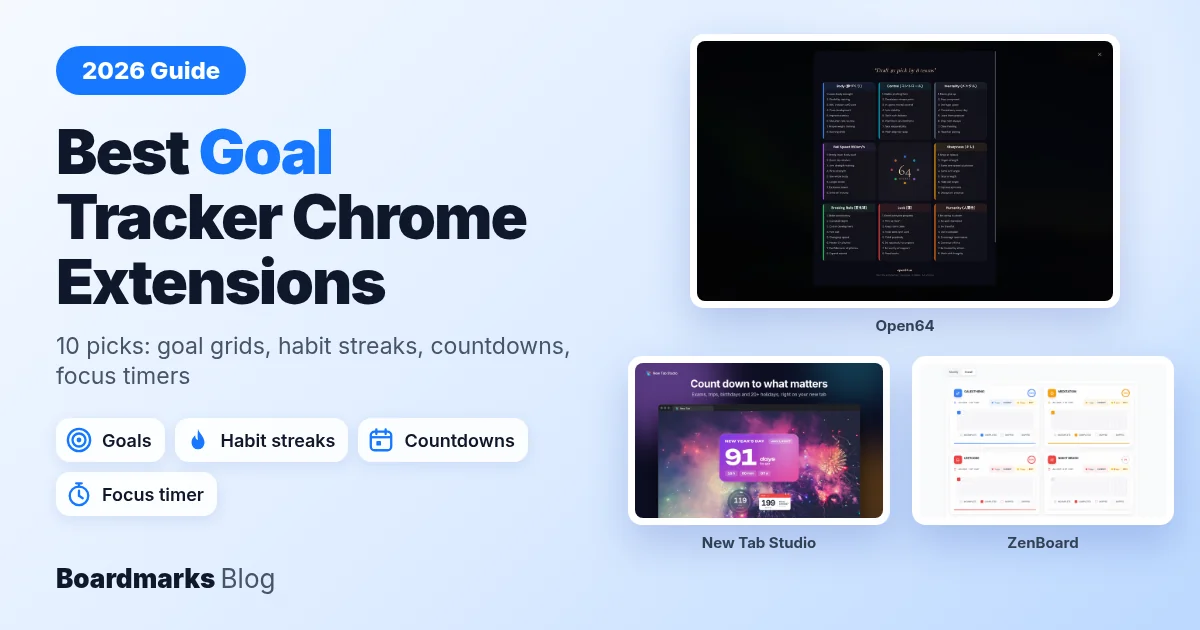
A goal tracker Chrome extension keeps your goal where you already look: the new tab page, or a small note on every page you open. A goal written in a notebook on Sunday is easy to forget by Wednesday. The best Chrome extensions for goal planning each do one job well. PurposeTab and Momentum put a daily focus on every new tab, Open64 breaks one big goal into 64 actions, New Tab Studio covers deadline countdowns and focus timers, and Todoist turns goals into dated tasks. We checked every pick against its Chrome Web Store listing and official site on 21 Oct 2026.
Quick picks:
Daily goals: PurposeTab for a daily intention, or Boardmarks (ours) if you want today's tasks and your goal links on the same new tab.
Habits: ZenBoard for timed and counted habits, or Habit Tracker for simple free checks with reminders.
Long-term plans and deadlines: Open64 to break one big goal into 64 actions, or New Tab Studio for countdowns to a hard date.
Focus: New Tab Studio, whose pomodoro timer keeps counting when you open a new tab.
Table of contents
Favorite Goal Tracker Chrome Extensions: The Short List
How to Choose a Goal Tracker Chrome Extension
Best Chrome Extensions for Goal Planning in 2026
Problems With Goal Tracker Extensions and When a Goal Setting App Is Better
FAQ
Conclusion: Pick One Goal Tracker and Keep It Visible
Favorite Goal Tracker Chrome Extensions: The Short List
Pick by the kind of goal you have. A daily intention needs a different tool from a five-year plan.
Daily focus: PurposeTab (intention, habits and a vision board) or Momentum (a calm new tab with Focus Mode).
One big goal: Open64 (a Harada method grid of 64 actions).
Deadlines: New Tab Studio (countdowns and a pomodoro timer) or Motivate (one goal and its date on every tab).
Tasks: Todoist for Chrome or TickTick.
Habits: ZenBoard, Habit Tracker, or Boardmarks (ours), which adds tasks and reminders next to your bookmark boards.
How to Choose a Goal Tracker Chrome Extension
Start with the type of goal. A goal tracker for an exam looks very different from one for a yearly plan.
One big goal: a grid tool such as Open64, where every action links back to one purpose.
Daily focus: one intention for today on every tab (PurposeTab, Momentum, Motivate).
Habits: streaks and check grids (ZenBoard, Habit Tracker, Boardmarks).
Deadlines: countdowns to an exam or launch (New Tab Studio, Motivate).
Tasks: dated steps you tick off (Todoist, TickTick).
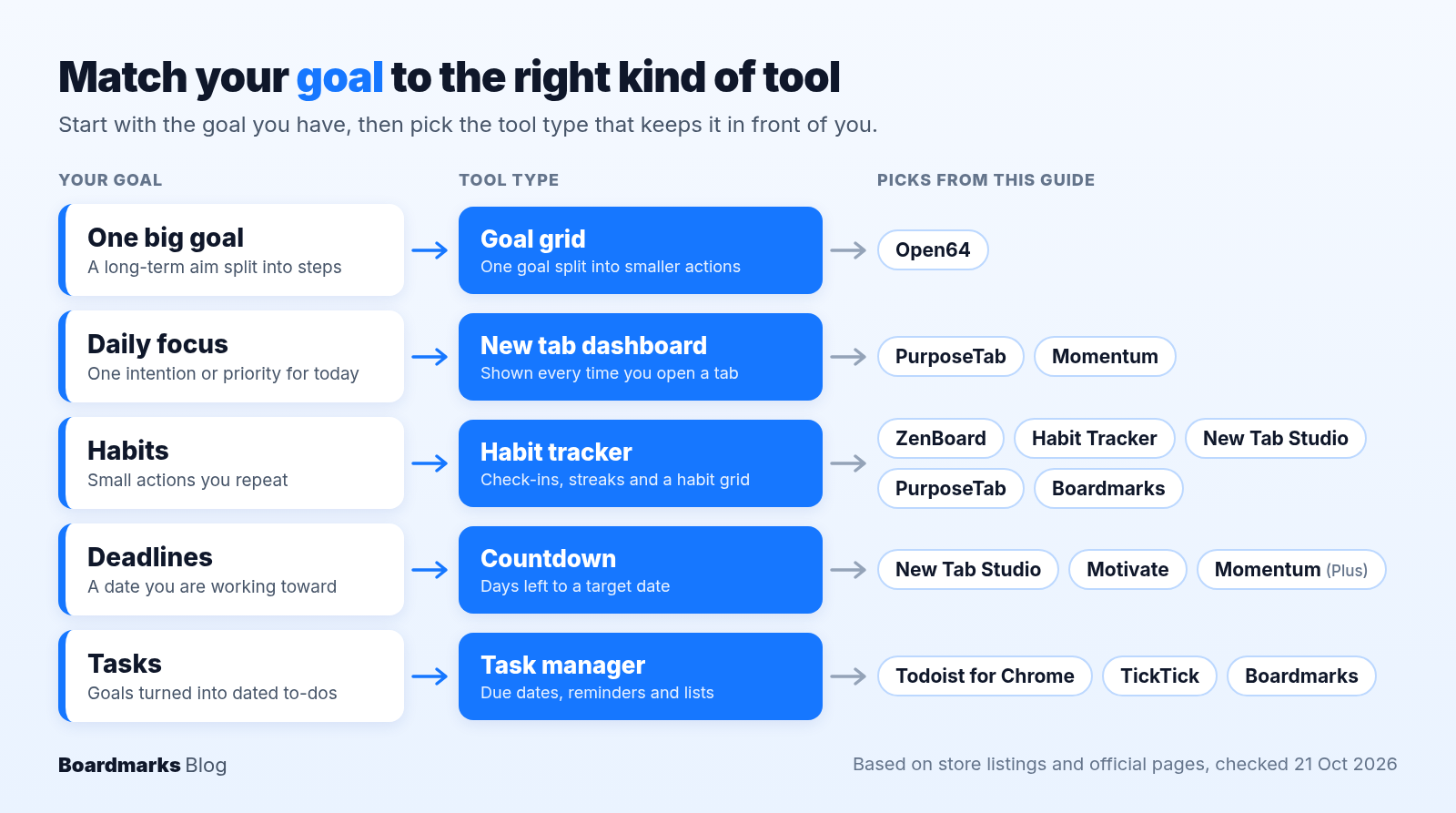
Where it shows up. Five picks replace the new tab page: PurposeTab, Momentum, New Tab Studio, Open64 and Boardmarks. Todoist, TickTick, ZenBoard and Habit Tracker open from the toolbar, and Motivate adds a small box to every page. You can only see one new tab page at a time, so choose one new tab tool. For other ideas, see how to customize your Chrome new tab.
Where your data lives. Some tools keep everything in your browser; others sync through Chrome or an account. Local data is private but can be wiped with your browser data.
Upkeep and price. The store listing shows users, rating count and the last update date. Then check what the free plan covers, since some tools put countdowns or vision boards behind a paid plan.
Focus timers. If your goal is measured in hours, a pomodoro Chrome extension feature inside your goal tool saves a second install. New Tab Studio, ZenBoard and Momentum Plus include one.
A habit tracker Chrome extension and a goal setting Chrome extension do different jobs. Habit tools count repeats, such as reading daily. Goal tools hold the outcome, the date and the steps. Many people use one of each, or one new tab like the Boardmarks habit tracker beside a task list.
Best Chrome Extensions for Goal Planning in 2026
Figures come from each Chrome Web Store listing and official pricing page, checked 21 Oct 2026. Nothing was tested hands-on: features come from listings and official sites, and the "Where it shows" column also uses each extension's published store package.
| Extension | Best for | Where it shows | Data storage | Rating (count) and users, checked 21 Oct 2026 | Price |
|---|---|---|---|---|---|
| Boardmarks (ours) | Links, tasks and habits together | New tab | Local by default | 5.0 (7), 40 users | 7-day trial; Pro from US$2.99/month |
| PurposeTab | Daily intention and vision board | New tab | Local, no account; Chrome sync | 4.9 (79), 1,000 users | No paid plan shown on listing |
| Momentum | Calm daily focus | New tab | Not detailed on listing; Plus uses a Momentum account | 4.2 (13.7K), 2,000,000 users | Free; Plus US$39.95/year |
| New Tab Studio | Countdowns and focus timer | New tab | In your browser, no sync | 4.8 (1.4K), 40,000 users | Free plan; PRO from US$4.99/month |
| Open64 | One big goal | New tab | On your device, no account | No ratings yet, 35 users | Free; optional US$29 AI package |
| Todoist for Chrome | Dated tasks | Toolbar | Todoist account, synced across devices | 4.8 (51.5K), 500,000 users | Free; Pro US$7/month |
| TickTick | Synced reminders | Toolbar | TickTick account, synced across devices (free plan included) | 3.4 (709), 200,000 users | Free; Premium US$49.99/year |
| ZenBoard | Timed and counted habits | Toolbar popup that opens a dashboard tab | Local, no account | 5.0 (9), 129 users | No paid plan mentioned on listing |
| Habit Tracker | Habits with reminders | Toolbar popup | Local, no cloud | 4.8 (65), 4,000 users | Free |
| Motivate | One goal and deadline | Every tab | Not stated; developer declares no data collection | 5.0 (4), 405 users | No paid plan shown on listing |
1. Boardmarks: Goal links, tasks and habits on one new tab
Boardmarks is our Chrome extension, so we are not neutral. We list it first because it is ours, not because it beats the others: it has no dedicated goal feature, but it keeps the links, tasks, habits and reminders behind a goal on one new tab.
Price: 7-day free trial with no card required, then Pro Monthly US$2.99 or Pro Lifetime US$4.99 (limited time, usual US$34.99). In India, Pro Monthly is ₹99 and Pro Yearly is ₹299 for one year (limited time, usual ₹999). Elsewhere, see the pricing page for the yearly price in your currency.
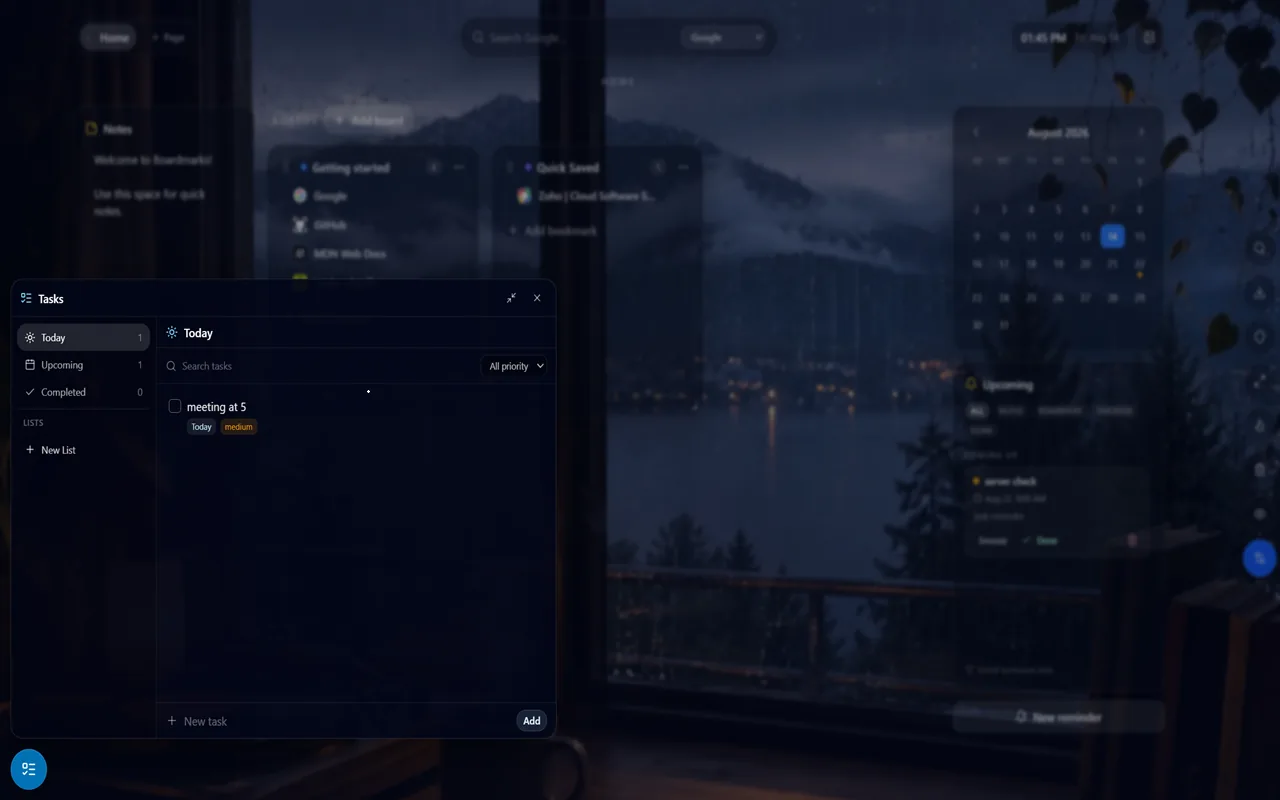
Key goal features
Todos in Today, Upcoming and Completed views, with due dates, next to bookmark boards
A weekly habit grid with current and best streaks per habit
Reminders with priority and daily, weekly or monthly repeats
Pros
Goal research links sit beside the tasks and habit grid.
Data stays in Chrome local storage by default.
Cons
No dedicated goal object, milestones or progress bar.
New and small (40 users, 7 ratings), and paid after the trial.
Verdict: a good fit when your goals depend on links and a habit grid is enough tracking.
2. PurposeTab: Daily intention, habits and a vision board on every tab
Price: The store listing shows no paid plan as of 21 Oct 2026.
PurposeTab is the most goal-focused new tab here. Your intention, habits and priorities sit on the left, and images of the goals you are working towards sit on the right. As a goal setting Chrome extension, it covers today and the bigger picture on one screen.
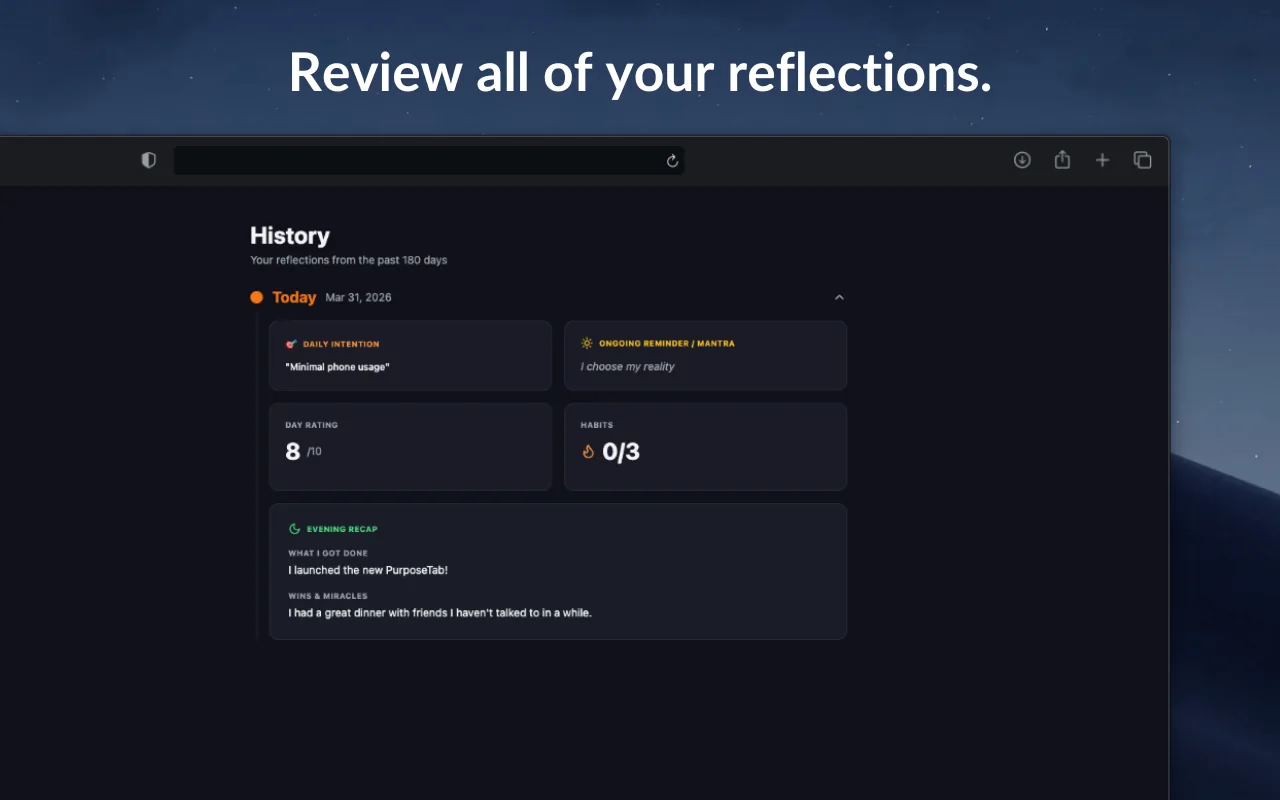
Key goal features
A daily intention that resets at midnight
Habits, a priority list and journaling prompts
A vision board of uploaded images with titles or dates
Pros
Data stays on your computer, works offline and needs no account.
Syncs through Chrome when you are signed in.
Cons
Small user base (1,000 users).
Verdict: the best all-round goal tracker for a daily focus and a vision board.
PurposeTab on the Chrome Web Store
3. Momentum: Daily focus and a calm new tab dashboard
Price: Free; Momentum Plus is US$39.95 billed annually.
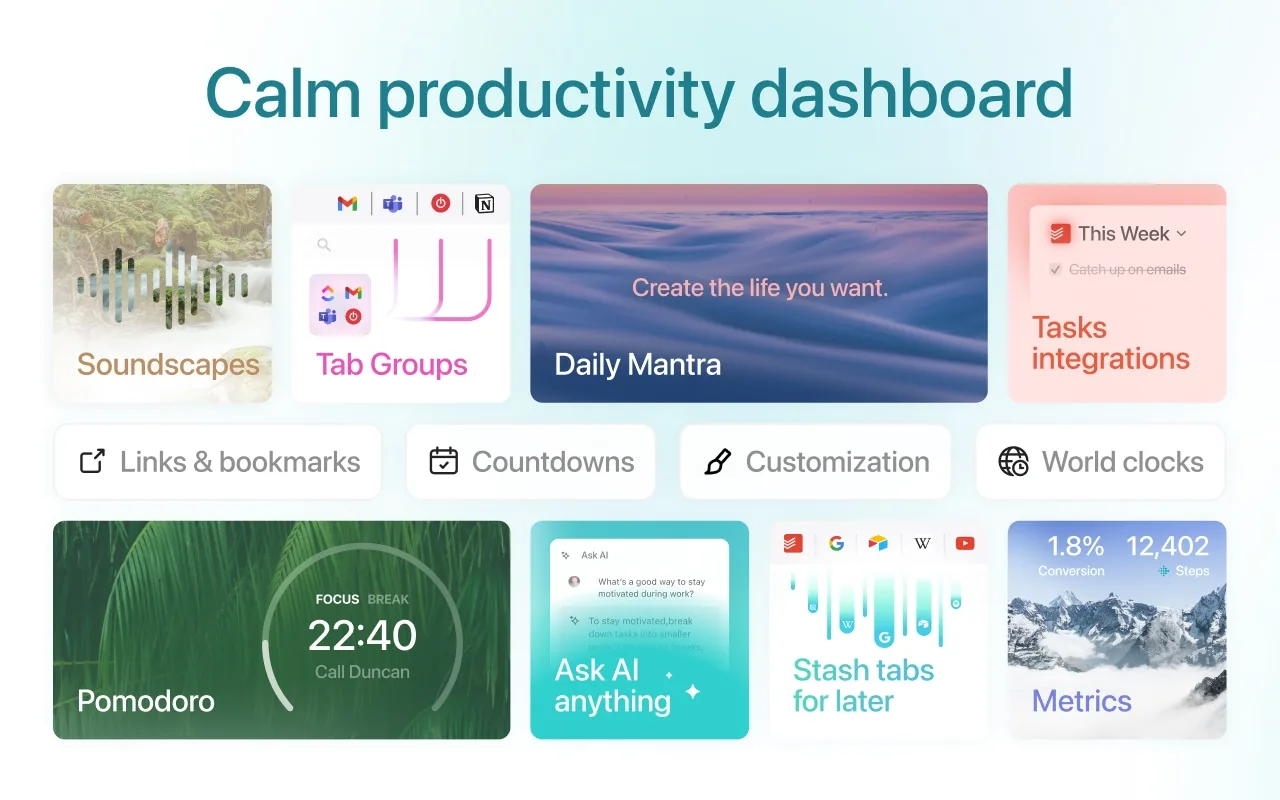
Momentum shows a new photo, mantra and quote each day, and has the biggest user base here. Momentum's free plan includes Focus Mode (with limited time) and to-do lists; focus timers, countdowns, habit Metrics and the vision board are Plus features.
Key goal features
Free: daily focus, Focus Mode with limited time, and to-do lists
Plus: vision board, Metrics for habits, Countdowns and a Pomodoro Timer
Plus: integrations with Todoist, Asana, ClickUp and more
Pros
2,000,000 users and a long track record.
Cons
The goal tracker parts need the yearly Plus plan.
A 4.2 rating, lower than most picks here.
Verdict: a calm daily reminder now, with goal tools if you pay later. See our Boardmarks vs Momentum comparison.
Momentum Plus | Chrome Web Store
4. New Tab Studio: Countdowns, habits and a pomodoro timer
Price: Free plan; PRO is US$4.99/month, US$39.96/year or US$59 one-time.
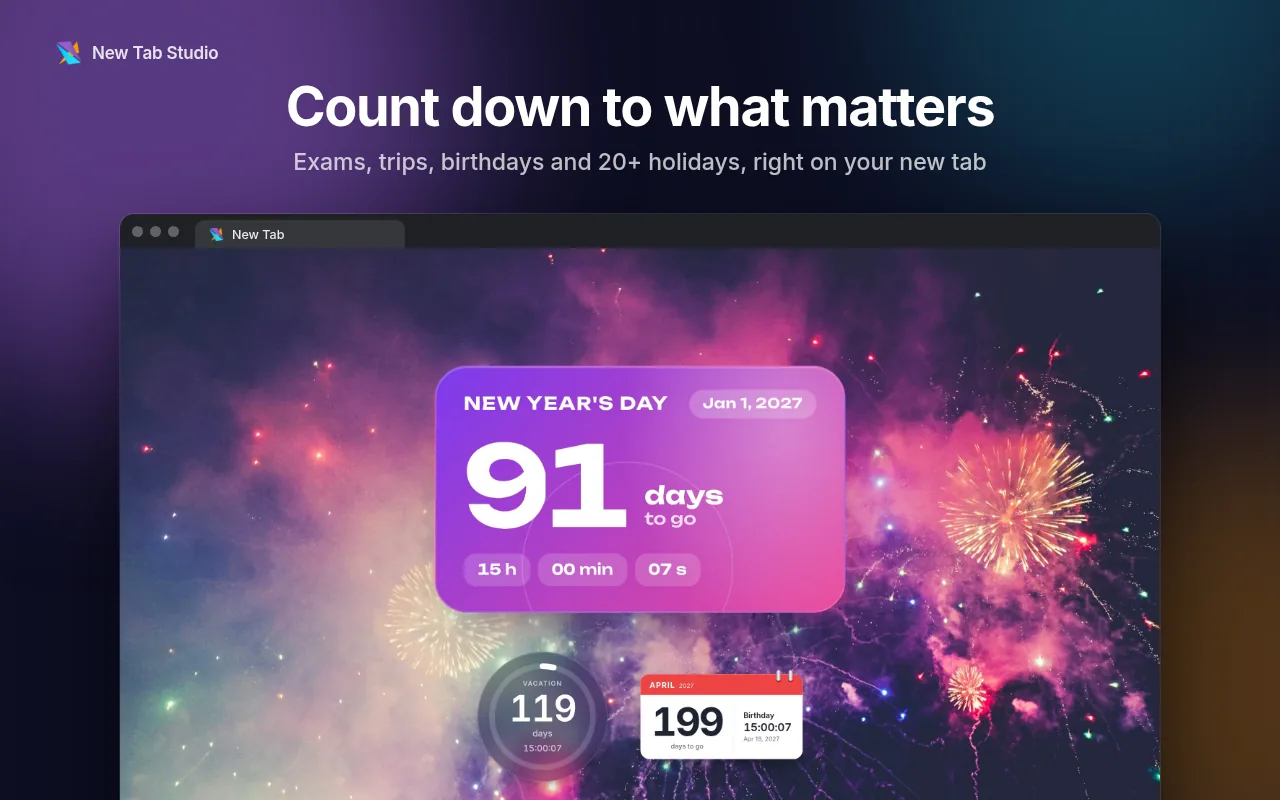
New Tab Studio turns the new tab into widgets you place yourself. If you want a pomodoro Chrome extension and a deadline countdown in one place, this is the closest match.
Key goal features
Countdowns to an exam or deadline, plus days since
A habit tracker with streaks and a daily focus goal
A pomodoro timer that keeps counting when you open a new tab
Pros
Deadlines, habits and focus time on one page.
Rated 4.8 from 1.4K ratings.
Cons
The free plan limits how many widgets you can add.
No sync: its site says "nothing moves between computers on its own."
Verdict: the best goal tracker for goals with hard dates.
New Tab Studio PRO | Chrome Web Store
5. Open64: One big goal broken into 64 actions
Price: The listing says it is completely free to use. Open64's site sells an optional AI-Guided Creation package for US$29 one-time.
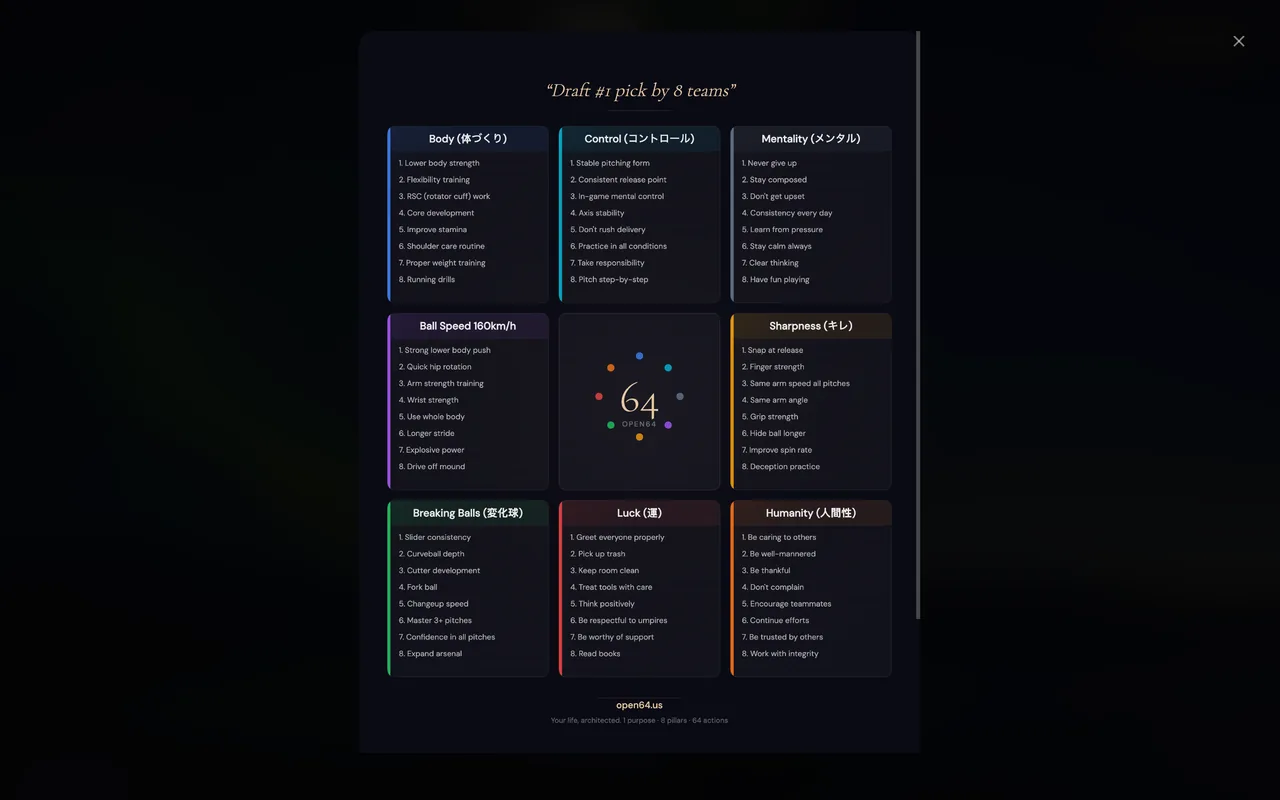
Open64 replaces your new tab with a Harada method grid (a mandala chart): one purpose, 8 pillars and 8 actions per pillar. It is the only goal setting Chrome extension here built to turn one large goal into concrete actions.
Key goal features
Tactical View for this year and a 25-year Vision View
10+ templates and an activity graph
Weekly focus, reflection prompts and optional AI suggestions
Pros
Works offline with no account.
Cons
Very new: 35 users and no ratings yet.
Heavy setup for a simple goal.
Verdict: worth a try if you have one big goal and like structure.
6. Todoist for Chrome: Turn goals into dated tasks
Price: Beginner is free. Pro is US$7/month or US$60/year at the time of writing, per Todoist Help.
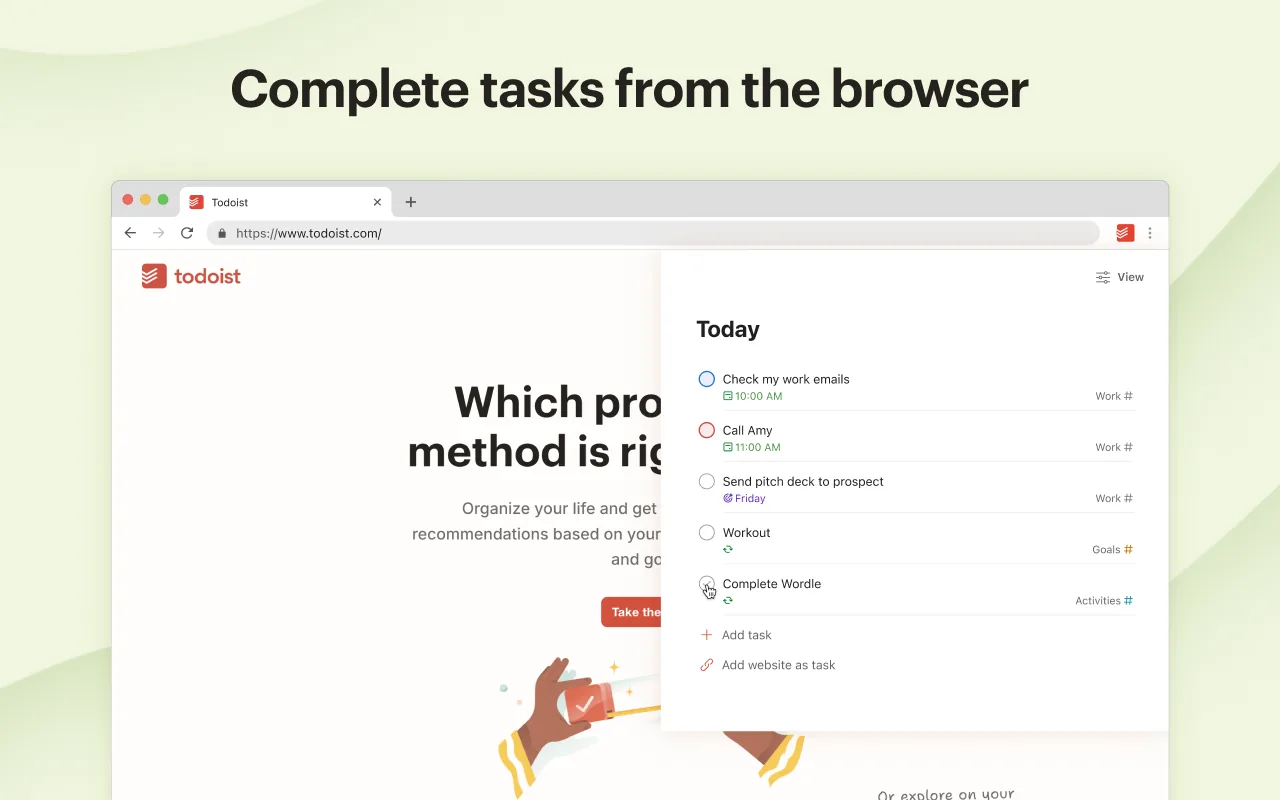
Todoist is a task manager, so it is not a goal tracker on its own. It is very good at capture, and used that way it works as a daily planner Chrome extension for the steps behind each goal.
Key goal features
Quick Add from any page, and selected text saved as a task
Plan your day as a list, board or calendar
Pro adds Deadlines and a Calendar layout
Todoist tracks daily and weekly task goals with streaks and Karma in its Productivity view; check it in the Todoist web app rather than expecting it in the extension popup.
Pros
Rated 4.8 from 51.5K ratings.
Cons
No goal object or progress bar, so each goal becomes a project.
Verdict: pick it if your goals are mostly steps, and pair it with a routine to turn goals into a daily plan.
Todoist | Chrome Web Store
7. TickTick: Tasks and reminders synced across devices
Price: Free; Premium is US$49.99/year.
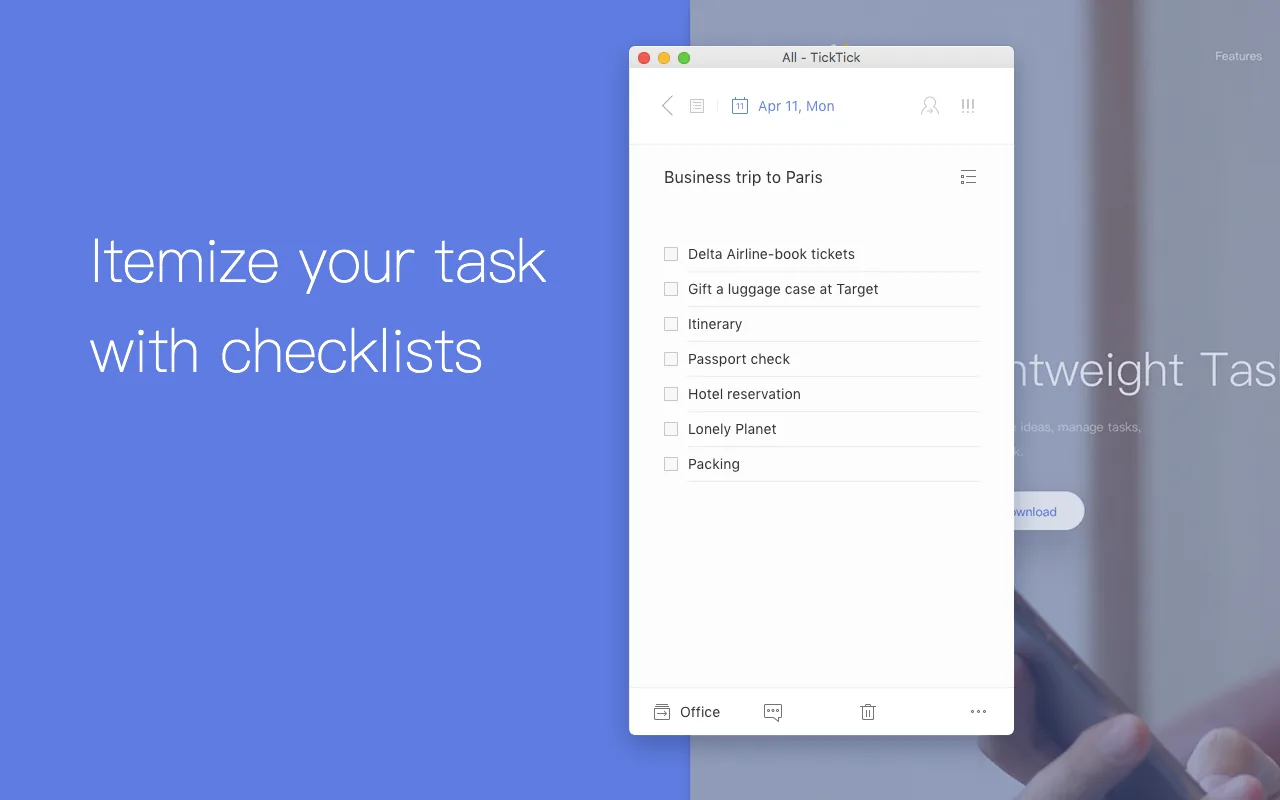
TickTick keeps your to-do list in the toolbar and syncs it with your other devices. The Chrome extension listing covers tasks, reminders and a calendar view, and it does not list habit or focus timer features.
Key goal features
Recurring tasks and time reminders
Subtask checklists and a calendar agenda view
Pros
Free plan with sync across devices.
Cons
The lowest rating here (3.4 from 709 ratings).
Verdict: fine if you already use TickTick on your phone.
8. ZenBoard: Habit tracker with timers and counts
Price: The store listing mentions no paid plan.
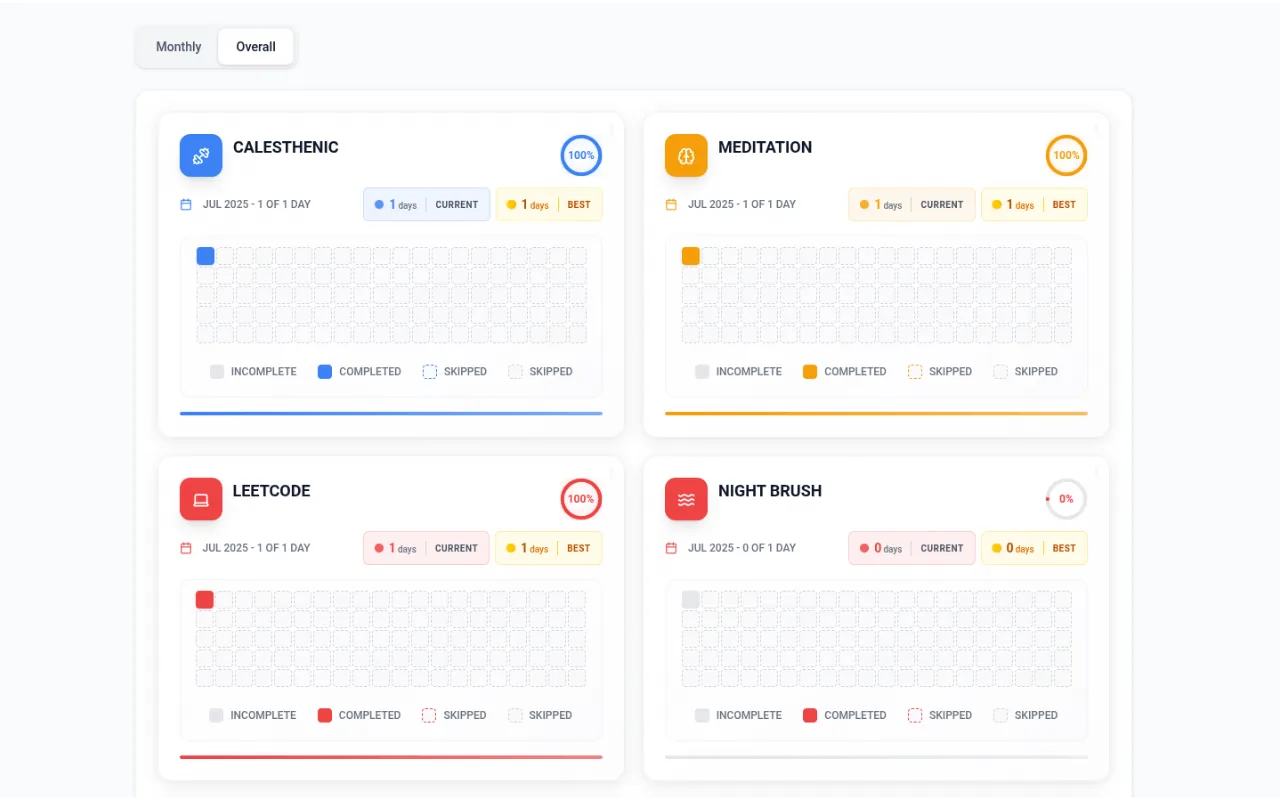
ZenBoard is a habit tracker Chrome extension that goes beyond yes or no. You can log habits by time with a built-in timer, by frequency, as tasks or as counts, which suits study hours or reading targets.
Key goal features
Streaks with daily and weekly stats
Pomodoro or custom intervals for study sessions
Pros
Tracks minutes and numbers; no account and no ads.
Cons
Small, with 129 users.
Verdict: the best habit pick for measurable goals.
9. Habit Tracker: Simple habit checks with reminders
Price: Free, according to the listing.
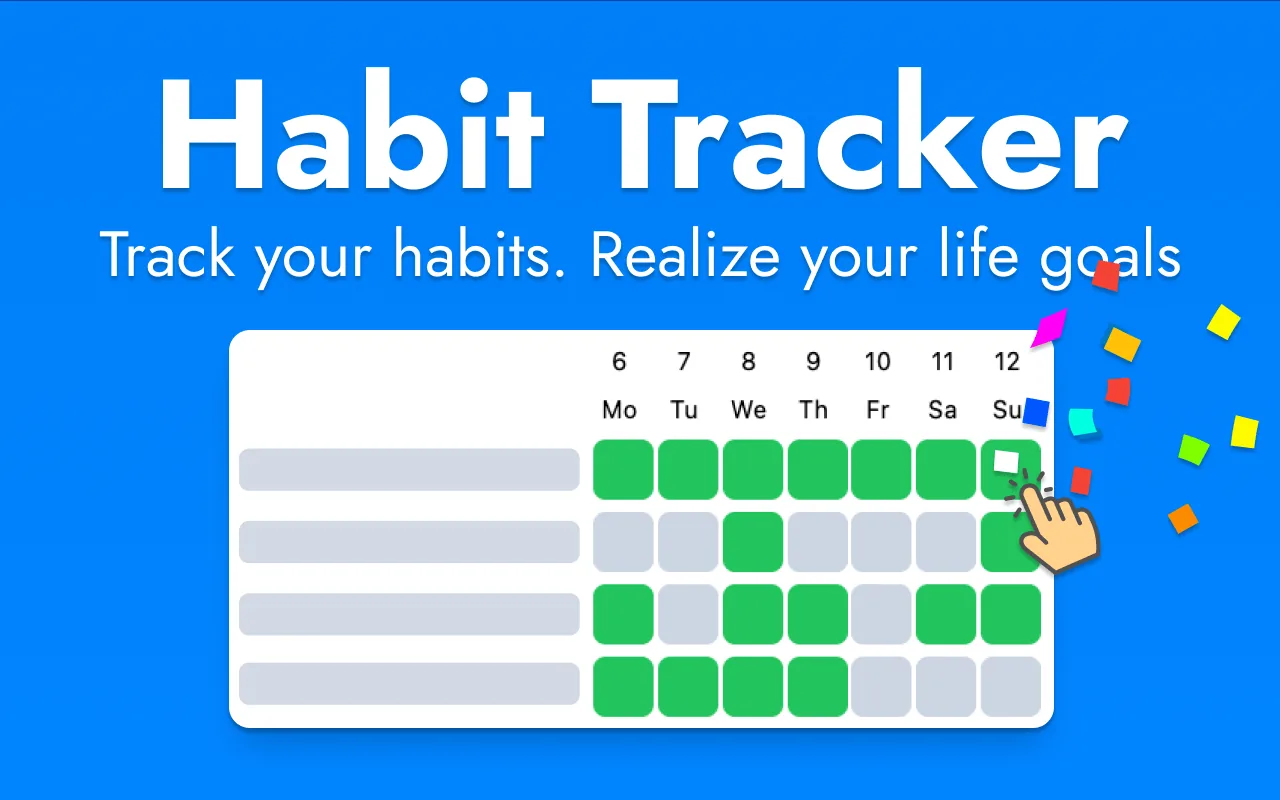
The listing names no developer or company, only a website and a contact email. It is a plain habit tracker Chrome extension that stores data locally.
Key goal features
Daily and hourly reminders
Weekly and monthly views
Printable templates you can save as a PDF
Pros
4,000 users and a 4.8 rating from 65 ratings.
Cons
Last updated June 2025.
Verdict: a solid free goal tracker for habits, with reminders.
If you would rather keep habits, tasks and goal links on the same new tab, the Boardmarks new tab extension
10. Motivate: One goal and its deadline in every tab
Price: The store listing shows no paid plan.
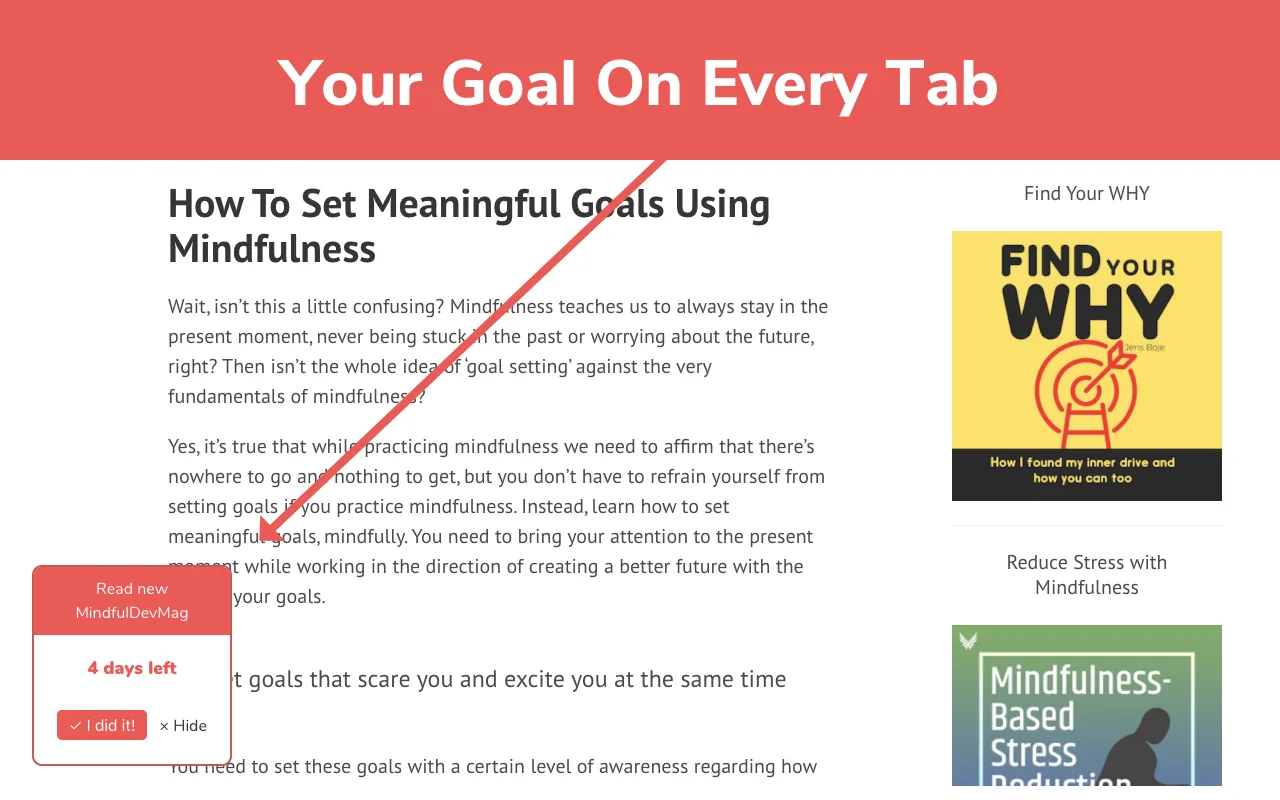
You set one goal and a target date, and Motivate shows them in the lower-left corner of every tab. It also shows a "Time Waster Warning" on well-known social media sites.
Key goal features
One goal and date on every page, not only the new tab
Warnings on social sites, including TikTok and X since version 1.0.3
Pros
The simplest goal tracker here, with almost no setup.
Cons
Tiny (405 users) and last updated February 2025.
Verdict: good for one short-term goal you keep putting off.
Problems With Goal Tracker Extensions and When a Goal Setting App Is Better
Small or abandoned extensions
Many goal tools are one-person side projects, so check the user count, rating count and "Updated" date on the listing. Habit Tracker and Motivate have not been updated for over a year. They may still work, but a tool without updates can break after a Chrome change.
Local-only data and uninstall risk
Local storage keeps a goal tracker private, but it ties your data to one browser profile. New Tab Studio's site warns that clearing browser data clears your page. Before you build months of streaks, check for an export or backup. Habit Tracker saves lists as a PDF, and Boardmarks offers optional cloud backup with Google sign-in on Pro.
Extension or goal setting app: when a goal planner app wins
An extension only helps at your computer. For goals that happen away from the desk, like workouts or sleep, a goal planner app on your phone can remind you anywhere. Many people use both: a goal setting app for logging on the go and an extension to keep the main goal in view at work.
Free alternatives already in your browser
A Google Doc or Sheet of goals, pinned as your first tab, costs nothing. Google Tasks handles dated steps, and our guide shows how to add a to-do list to Chrome. For broader picks, see our Chrome extensions for general work.
Two names from older lists are not Chrome extensions today. Strides is a goal and habit app on Apple's App Store, and we found no Chrome Web Store listing for it. The official Habitica extension was pulled from the Chrome Web Store in March 2019, according to the project's GitHub issue.
FAQ
- What is the best goal tracker Chrome extension?
- It depends on the goal. PurposeTab is the best all-round goal tracker Chrome extension for a daily intention, habits and a vision board. Open64 suits one big goal, New Tab Studio suits deadlines, and Todoist suits goals that are mostly tasks.
- Is there a free goal setting Chrome extension?
- Yes. Open64's listing says it is completely free to use, Habit Tracker is free, and PurposeTab and Motivate show no paid plan on their listings. Momentum and New Tab Studio have free plans, with some goal features paid.
- Can a habit tracker Chrome extension track goals too?
- Partly. A habit tracker Chrome extension counts repeated actions, which helps with goals built on habits, and ZenBoard can also track minutes and counts. For an outcome with a date, add a goal tool like Open64 or Motivate.
- Is a Chrome extension better than a goal setting app?
- At your desk, yes, because the goal shows every time you open a tab. A goal setting app on your phone is better for goals that happen away from the computer, such as exercise or sleep. Many people use both.
- Is there a daily planner Chrome extension that shows goals on the new tab?
- Yes. PurposeTab shows a daily intention and priorities on the new tab, and New Tab Studio has a daily focus goal and a to-do list. For the routine itself, see how to plan your day.
- Which goal tracker extensions have a pomodoro timer?
- New Tab Studio has a pomodoro timer that keeps counting across new tabs, ZenBoard offers Pomodoro or custom intervals, and Momentum lists a Pomodoro Timer as a Plus feature. The TickTick extension listing does not include one.
Conclusion: Pick One Goal Tracker and Keep It Visible
The best goal tracker Chrome extension is the one you see every day. Pick by goal type: PurposeTab or Momentum for daily focus, Open64 for one big goal, New Tab Studio or Motivate for deadlines, ZenBoard or Habit Tracker for habits, and Todoist or TickTick for the tasks behind them. Use one goal tracker for two weeks before you add another.
If your goals live next to research links, Boardmarks puts tasks, habits and reminders on one new tab. More tools are in our work from home tools list.
Chrome New Tab extension
Organize bookmarks, todos, and habits on every New Tab.
- Visual bookmark boards
- Todos, habits, notes, reminders
- Local-first by default
Free trial · no card required