Bookmark manager
A Visual Bookmark Manager Built for Chrome's New Tab
Boardmarks is a visual Chrome bookmark manager and organizer. Instead of hunting through nested folders, you keep links on boards you can move, resize, and color — right where you open every New Tab.
7-day free trial · No card required
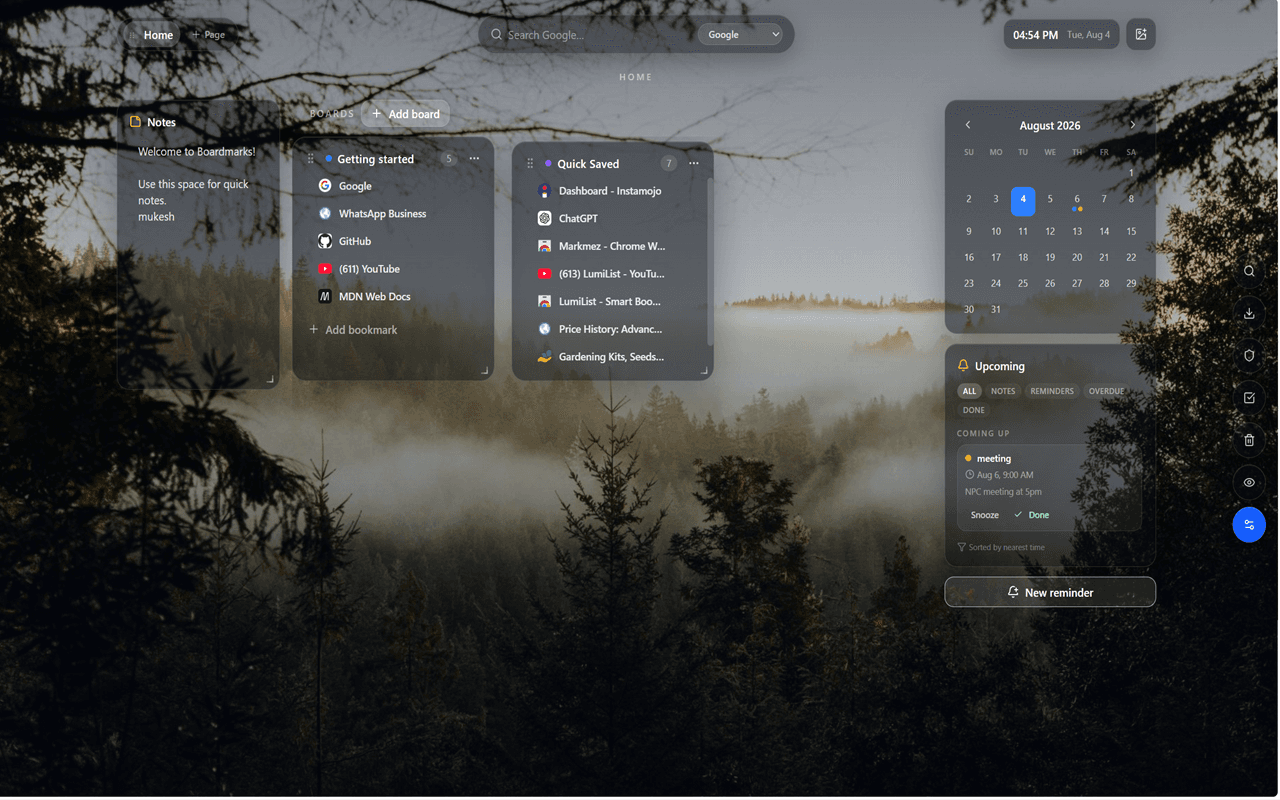
What Boardmarks bookmark management does
Boardmarks turns Chrome bookmarks into a visual workspace. Create Pages and Boards, drop links onto them, and rearrange layouts so the sites you use most stay in view — not buried three folders deep.
Visual boards instead of folder trees
Boards support drag-and-drop, resize, and color so related links stay grouped. A Quick Saved board captures fast additions without interrupting your browsing flow. This is the core of Boardmarks as a bookmark manager with boards.
Quick Save and save all open tabs
Use the toolbar popup to save the current tab, or save all open tabs when a research session piles up. Close the window when you are done — your links stay on boards waiting for you.
Import existing Chrome bookmarks
Migrate folder bookmarks into visual boards so switching from Chrome’s default bookmark manager does not mean starting over. Keep the bar for a few pinned favorites if you want; use Boardmarks for the rest of your library.
Organization workflow
Privacy and local-first storage
Workspace data stays in Chrome local storage by default. Privacy mode can blur titles when someone is nearby. Optional Google sign-in supports licensing and manual cloud backup — not ad tracking. Read the privacy policy.
Who it is for
People who outgrow the bookmark bar, keep many research tabs, or want a Chrome New Tab productivity workspace that still starts with bookmarks — students, operators, founders, and anyone tired of lost links.
Boardmarks vs Chrome's default bookmark manager
Chrome’s manager is excellent for hierarchical folders and sync across Google profiles. Boardmarks focuses on visibility and daily use: boards on New Tab plus habits, reminders, and tasks in the same place. Many people use both — Chrome sync for backup, Boardmarks for the working set they open every day.
Frequently asked questions
- Is Boardmarks a Chrome bookmark manager?
- Yes. Boardmarks is a visual bookmark manager that runs on Chrome’s New Tab, with boards instead of deep folder trees.
- Can I import my existing Chrome bookmarks?
- Yes. You can import Chrome bookmarks into visual boards so you do not have to rebuild your library from scratch.
- Can I save all open tabs?
- Yes. From the toolbar popup you can save the current tab or all open tabs into boards.
- How is this different from Chrome’s bookmark bar?
- The bookmark bar is great for a few favorites. Boardmarks keeps many links visible on boards and pairs them with todos, habits, notes, and reminders on the same New Tab.
Ready to try Boardmarks?
Install from the Chrome Web Store and start with a free 7-day trial. Pricing details are on our pricing page.
Add Boardmarks to Chrome — Free