New Tab
Turn Every Chrome New Tab Into Your Productivity Workspace
Looking for a Chrome New Tab productivity extension? Boardmarks turns every new tab into a visual workspace — bookmarks, todos, habits, notes, and reminders in one customizable dashboard.
7-day free trial · No card required
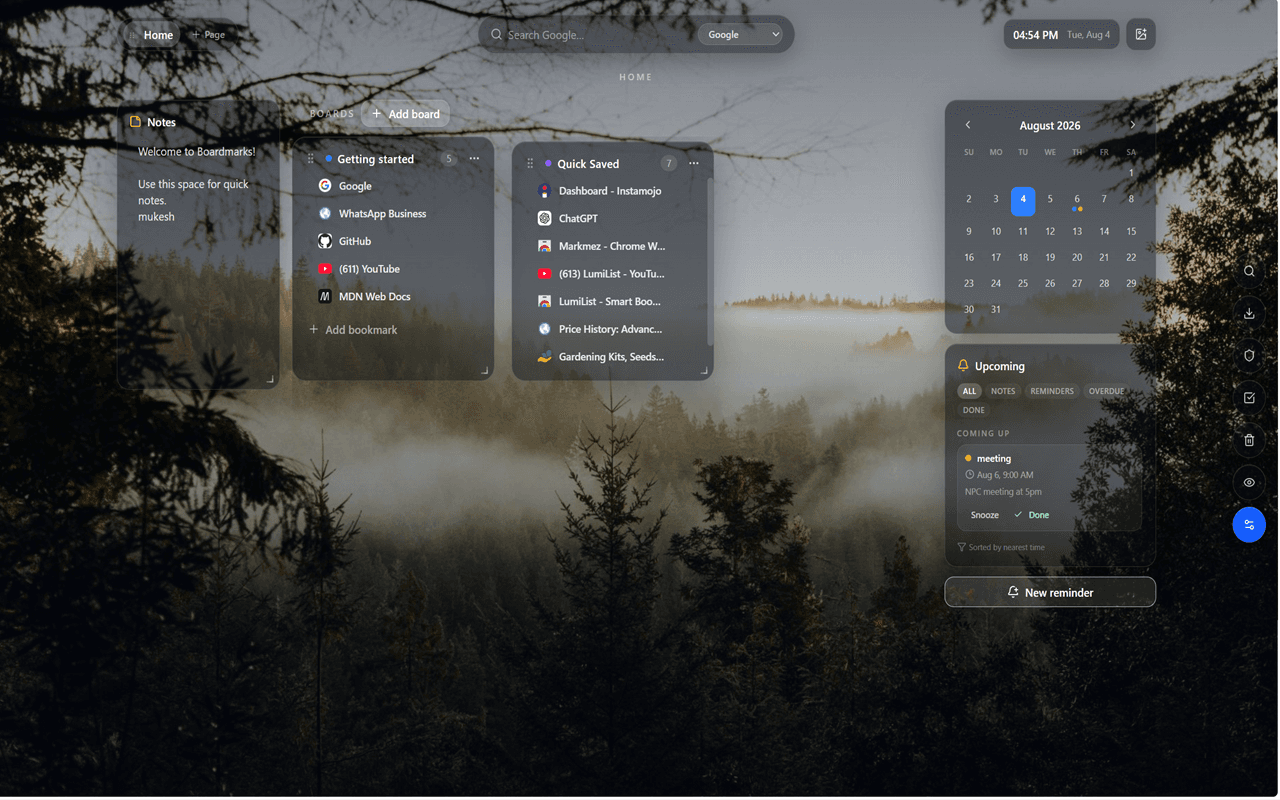
One New Tab, many tools
Boardmarks is a visual Chrome bookmark manager and New Tab productivity workspace that combines bookmarks, todos, habits, notes and reminders. It is built as a Manifest V3 Chrome extension available on the Chrome Web Store.
Most productivity extensions pick one job: either a pretty wallpaper, or a simple to-do list, or a tab manager. Boardmarks integrates all of these into a single, coherent workspace that loads automatically every time you open a new tab. There is no setup ritual — your workspace is already there the moment you need it.
What you get on the New Tab
- Visual bookmark boards — organize links into labeled boards you can drag, resize, and color instead of nesting them in folders.
- Save all tabs — capture the current tab or every open tab into boards from the toolbar popup in one click.
- Todos — Today, Upcoming, and Completed task views for daily planning without leaving your start page.
- Habit tracker — weekly check grid with streak tracking so daily habits stay visible next to everything else.
- Notes — scratch notes for quick capture and calendar notes tied to specific dates.
- Reminders — timed alerts with priority, optional recurrence, and sticky due notifications.
- Calendar — built-in calendar for date navigation and attaching notes to days.
- Google Apps launcher — optional shortcuts to Gmail, Drive, Calendar, Meet, and more.
- Customizable wallpapers — images, GIFs, WebP, and video backgrounds with glass-style board UI.
Daily productivity workflow
Open a new tab, glance at boards and todos, check the habit tracker, catch due reminders, and jump into Google Apps when needed — without bouncing between half a dozen sites. A typical morning ritual with Boardmarks takes two minutes: check the habit tracker, review Today's tasks, open the relevant project board, and start work. Everything is in one place because Boardmarks runs on the New Tab you would have opened anyway.
Why a New Tab extension beats a standalone app
Standalone productivity apps rely on a habit you have to build separately: remembering to open them. New Tab extensions are different because they benefit from a habit you already have — opening a new tab to browse. Every time you hit Ctrl+T or Cmd+T, Boardmarks appears. You see your todos, your habits, your bookmark boards. Productivity is embedded in the workflow instead of sitting beside it.
This integration is especially valuable for knowledge workers who use the browser as their primary work environment. If you spend most of your day in Chrome, your productivity system should live in Chrome too — not in a separate native app you open intentionally when you remember.
Customizable Chrome New Tab
Personalize with image, GIF, WebP, or video wallpapers and a glass-style UI. The workspace adapts to any background — boards and panels use a frosted-glass appearance so everything stays readable regardless of the wallpaper. Details on the customizable Chrome New Tab page.
Bookmarks plus planning
Unlike New Tab themes that only change wallpaper, Boardmarks includes a full visual Chrome bookmark manager with Quick Save and save all tabs. Bookmarks are not an afterthought — they are the core organizing feature that makes the New Tab a genuine working environment rather than a dashboard you glance at.
Local-first by default
Your workspace stays on your device unless you choose optional manual cloud backup after signing in for licensing. That keeps everyday use private while still supporting Pro plans when you need them. Because data is stored in Chrome local storage, Boardmarks also works offline — bookmarks, todos, habits, and notes are all accessible without an internet connection.
Getting started
Install Boardmarks from the Chrome Web Store. Open a new tab — Boardmarks loads immediately as your New Tab page. A 7-day free trial starts automatically from the extension. Add your first board, save a few bookmarks, create a todo, and set up a habit or two. Most users have a working setup in under five minutes because there is no complex configuration — Boardmarks has sensible defaults and you add to them as you go.
Explore individual features on the features overview page, or go directly to what interests you most: bookmark manager, todos, habits, notes, or reminders.
Frequently asked questions
- Is Boardmarks a Chrome New Tab extension?
- Yes. After install, Boardmarks loads when you open a new tab and becomes your productivity start page.
- What can I do on the New Tab?
- Organize visual bookmark boards, manage todos and habits, take notes, set reminders, use calendar notes, open Google Apps, and customize the wallpaper.
- Does it replace my search engine?
- No. Optional New Tab search uses your existing Chrome default search provider via the Chrome Search API.
- Is Boardmarks available on the Chrome Web Store?
- Yes. Boardmarks is a Manifest V3 Chrome extension available on the Chrome Web Store. A 7-day free trial starts from the extension after install.
- Does Boardmarks work offline?
- Yes. Because workspace data is stored in Chrome local storage by default, Boardmarks works without an internet connection for most features.
- What is Manifest V3?
- Manifest V3 is Chrome's latest extension platform standard. Boardmarks is built on Manifest V3, which means better security and long-term Chrome store support.
Ready to try Boardmarks?
Install from the Chrome Web Store and start with a free 7-day trial. Pricing details are on our pricing page.
Add Boardmarks to Chrome — Free