Customize
A Customizable Chrome New Tab That Still Gets Work Done
Boardmarks is a customizable Chrome New Tab — your wallpaper, your layout, and a productivity workspace — not just a pretty background.
7-day free trial · No card required
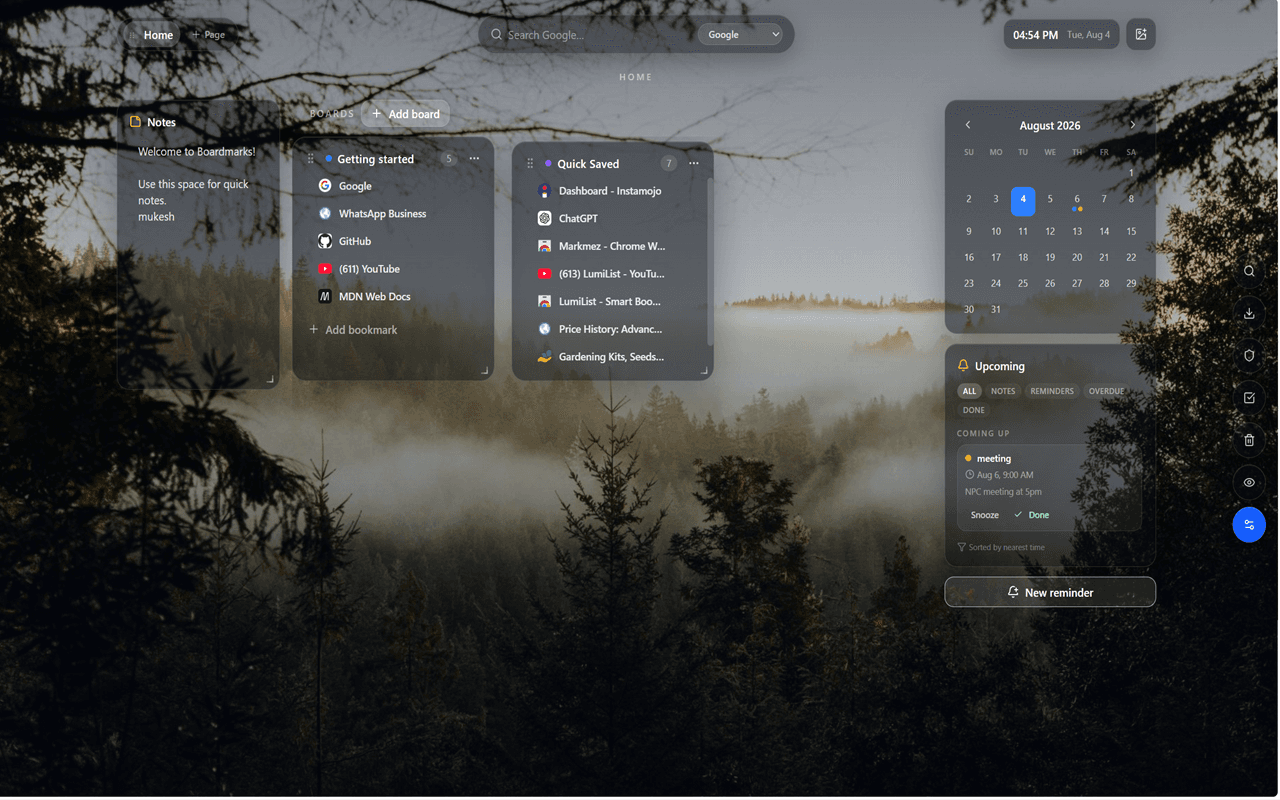
Your New Tab should reflect how you work
Chrome's default New Tab is functional but forgettable — a blank white page or a grid of recently visited sites. Most productivity extensions fix this by adding a beautiful photo and a single to-do list. Boardmarks goes further: it is a complete workspace you can customize visually and populate with the tools that actually matter to how you work. The aesthetic choices and the productivity features reinforce each other instead of competing for space.
Wallpapers that fit your style
Set image, GIF, WebP, or video backgrounds behind glass boards so the New Tab feels personal without hiding your tools. Static images work well for calm, distraction-free setups — a landscape, an abstract gradient, or a minimal pattern. Animated GIFs and WebP files add subtle movement without the performance cost of video. Short video clips create a truly live desktop feel.
The glass-style UI adapts to whatever background you choose. Boards, panels, and cards use a frosted-glass appearance so links and information remain readable against any wallpaper — light, dark, colorful, or textured.
Glass UI and board layout
Every board, panel, and modal in Boardmarks uses a consistent glass-style design that feels modern without being distracting. Boards sit as floating panels over your wallpaper, and you can arrange, resize, and color-code them to create a layout that matches your personal workflow. Common layout patterns:
- Quick links column on the left, todo list on the right
- Project boards in the center, habits and reminders in a sidebar
- Work boards at the top, personal boards below
- Full-width bookmark board with the todo panel in a narrow strip
Because you set the layout, the New Tab reflects your priorities rather than a default arrangement made for the average user.
Google Apps launcher
Optionally keep Gmail, Drive, Calendar, Meet, Docs, Sheets, and more one click away — useful when your New Tab is already home base. The launcher is optional because not everyone needs Google Apps shortcuts, but for teams and professionals who live in Google Workspace it is a time-saver. Open your New Tab, glance at your boards, check the habit tracker, and open Drive — all from one place without typing URLs or hunting through bookmarks.
Customization beyond wallpapers
Visual customization in Boardmarks extends past the background image. Each bookmark board can have its own color, helping you quickly distinguish project boards from personal boards or work boards from reading lists. Board titles, card layouts, and panel positions are all configurable. The result is a New Tab that looks intentional — like a workspace you have set up deliberately — rather than a cluttered collection of default panels.
Customization plus organization
Pair aesthetics with a visual bookmark manager, todos, and reminders. A beautiful wallpaper is a nice start, but the reason Boardmarks replaces plain wallpaper extensions is that everything functional — bookmarks, tasks, habits, notes — lives on the same page. You get a New Tab that is both pleasant to look at and genuinely useful as a starting point for the day.
Explore the full Chrome New Tab productivity extension overview to see everything Boardmarks includes beyond customization.
Privacy and local wallpaper storage
Wallpaper files you upload are stored in Chrome local storage — they do not leave your device. If you use an image URL instead of an upload, only that URL is stored. Boardmarks does not track which wallpaper you use or share that preference with advertising networks. Privacy Mode, when enabled, blurs board and task content for sensitive moments like screen-shares — it works independently of your wallpaper choice so the aesthetic stays intact while content is protected.
Frequently asked questions
- Can I customize my Chrome New Tab with Boardmarks?
- Yes. Choose image, GIF, WebP, or video wallpapers behind a glass-style UI, and optionally show a Google Apps launcher.
- Is it only a wallpaper extension?
- No. Customization sits on top of a full workspace: visual bookmarks, todos, habits, notes, and reminders.
- What file types are supported for wallpapers?
- Boardmarks supports standard images (JPEG, PNG), animated GIFs, WebP files, and short video clips as New Tab wallpapers.
- What is the Google Apps launcher?
- An optional row of shortcuts to Gmail, Drive, Calendar, Meet, Docs, Sheets, and other Google services — one click from your New Tab.
- Will my customization slow down Chrome?
- Wallpapers load from local storage or a cached URL, so performance impact is minimal. Video wallpapers do use more GPU than static images.
Ready to try Boardmarks?
Install from the Chrome Web Store and start with a free 7-day trial. Pricing details are on our pricing page.
Add Boardmarks to Chrome — Free