Todos
A New Tab Todo List Built Into Chrome
Boardmarks adds a New Tab todo list to Chrome so your tasks appear every time you open a tab — next to bookmarks, habits, and notes instead of buried in another app.
7-day free trial · No card required
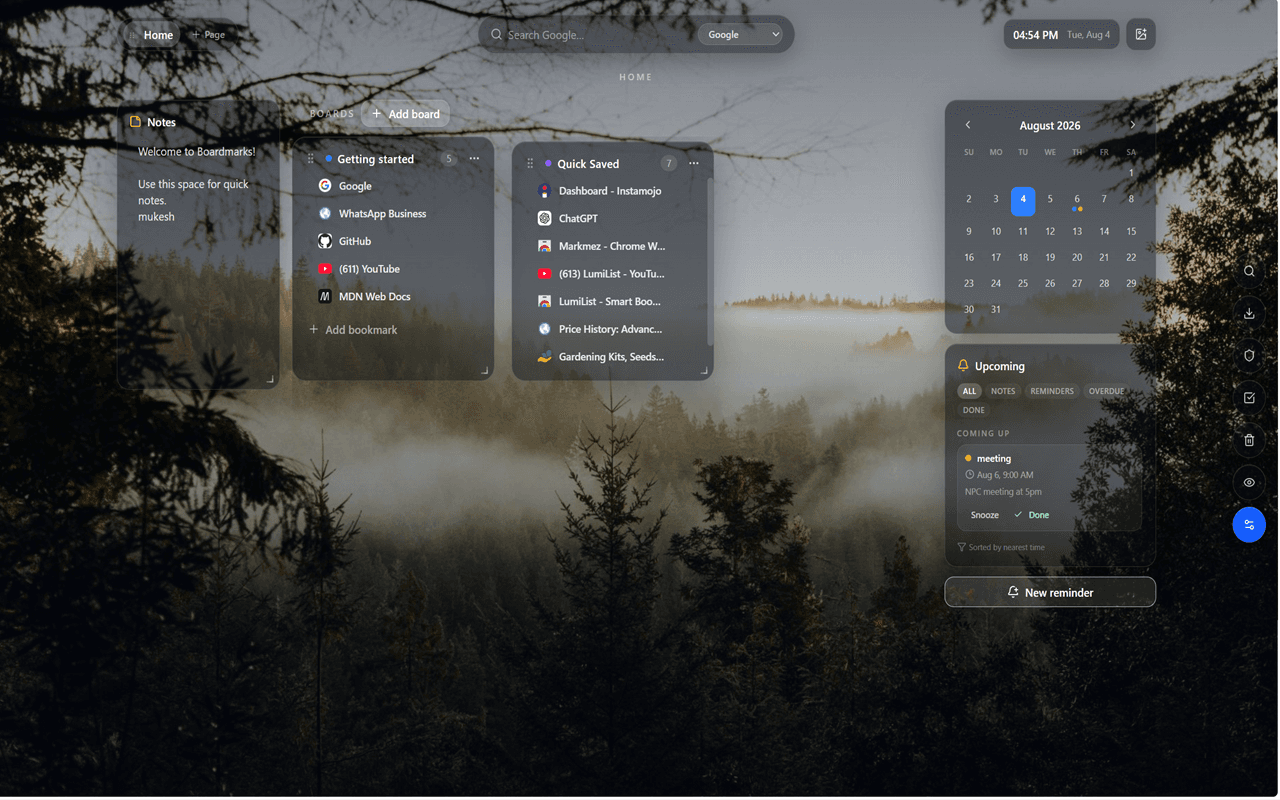
Today, Upcoming, and Completed
The Boardmarks task system is organized into three views that mirror how most people actually think about their work. Today shows only what needs to happen now — a short, focused list you can act on without scrolling through everything else. Upcoming holds tasks with future due dates so you can plan ahead without cluttering your today view. Completed archives finished work so you have a record without it staying on the active lists.
Tasks stay visible on the same surface as your bookmark boards, which means switching from planning to working is as simple as clicking a board link — not opening another tab or app.
Why a New Tab todo list works better than a separate app
Separate task apps have a visibility problem: you open them intentionally, check your list, close them, and forget about tasks until the next intentional check. A todo list on your New Tab is different — it appears automatically every time you open a new browser tab, which happens dozens of times a day. Tasks are always in view without requiring you to remember to open a different app.
This passive visibility matters most for the "I'll do this after my current task" items. Instead of filing them somewhere and forgetting, they surface again the next time you open a new tab, naturally reminding you without needing a push notification or an alarm.
How to use the todo list effectively
The most effective pattern for New Tab todos is the classic daily planning ritual:
- Start the day by opening a new tab and reviewing Today — confirm the list is realistic for the hours you have.
- Move urgent Upcoming items to Today when priorities shift mid-day.
- Add tasks as they come up during meetings or email — the New Tab is always one Ctrl+T away.
- Mark done as you finish — the satisfaction of clearing Today motivates continued progress.
- End of day: move unfinished items to Upcoming for tomorrow, then close the loop with a habit check in the habit tracker.
Use cases
- Morning planning before email
- Project checklists next to research boards
- Pairing tasks with daily habits for a complete daily routine
- Leaving yourself notes via New Tab notes next to tasks that need context
- Freelance client task lists beside bookmarked project resources
- Student assignment lists next to research bookmark boards
- Weekly review checklists triggered by a recurring reminder
Todos and reminders together
Todos are list items you control manually — you decide when to move them to Today and when to mark them done. Reminders are for tasks with a hard time: a bill payment at noon, a call at 3 PM, or a weekly review every Friday. Use both together: create a todo for the work, and add a reminder for the deadline so you get an alert when time matters. Both are visible from the same New Tab workspace.
Part of a full New Tab workspace
Todos are one piece of Boardmarks' Chrome New Tab productivity extension. The full workspace also includes a visual bookmark manager with boards, a daily habit tracker, scratch and calendar notes, and timed reminders with recurrence. Everything shares one page, so switching from task management to bookmark browsing to habit review is a single click — not a context switch between apps.
Local-first task storage
Like all Boardmarks data, todos are stored in Chrome local storage by default. Your task list does not pass through a third-party server during normal use. Optional cloud backup is available via Google sign-in for Pro licensing — it is not required to use the todo list. This keeps everyday task management private, fast, and available even when your internet connection is spotty.
Frequently asked questions
- Does Boardmarks include a New Tab todo list?
- Yes. Boardmarks includes task views such as Today, Upcoming, and Completed on your Chrome New Tab.
- Can I use todos with bookmarks?
- Yes. Todos sit beside visual bookmark boards so planning and browsing share one start page.
- Can I set due dates on todos?
- Yes. Todos support due dates that feed into the Upcoming view so tasks are sorted by when they need to happen.
- What is the difference between a todo and a reminder?
- Todos are list items you manage manually — move to Today, mark done, archive. Reminders fire a timed alert at a specific date and time and can repeat on a schedule.
- Is the todo list available without installing Boardmarks?
- The todo list is part of the Boardmarks Chrome extension. Install from the Chrome Web Store to use it on your New Tab.
Ready to try Boardmarks?
Install from the Chrome Web Store and start with a free 7-day trial. Pricing details are on our pricing page.
Add Boardmarks to Chrome — Free