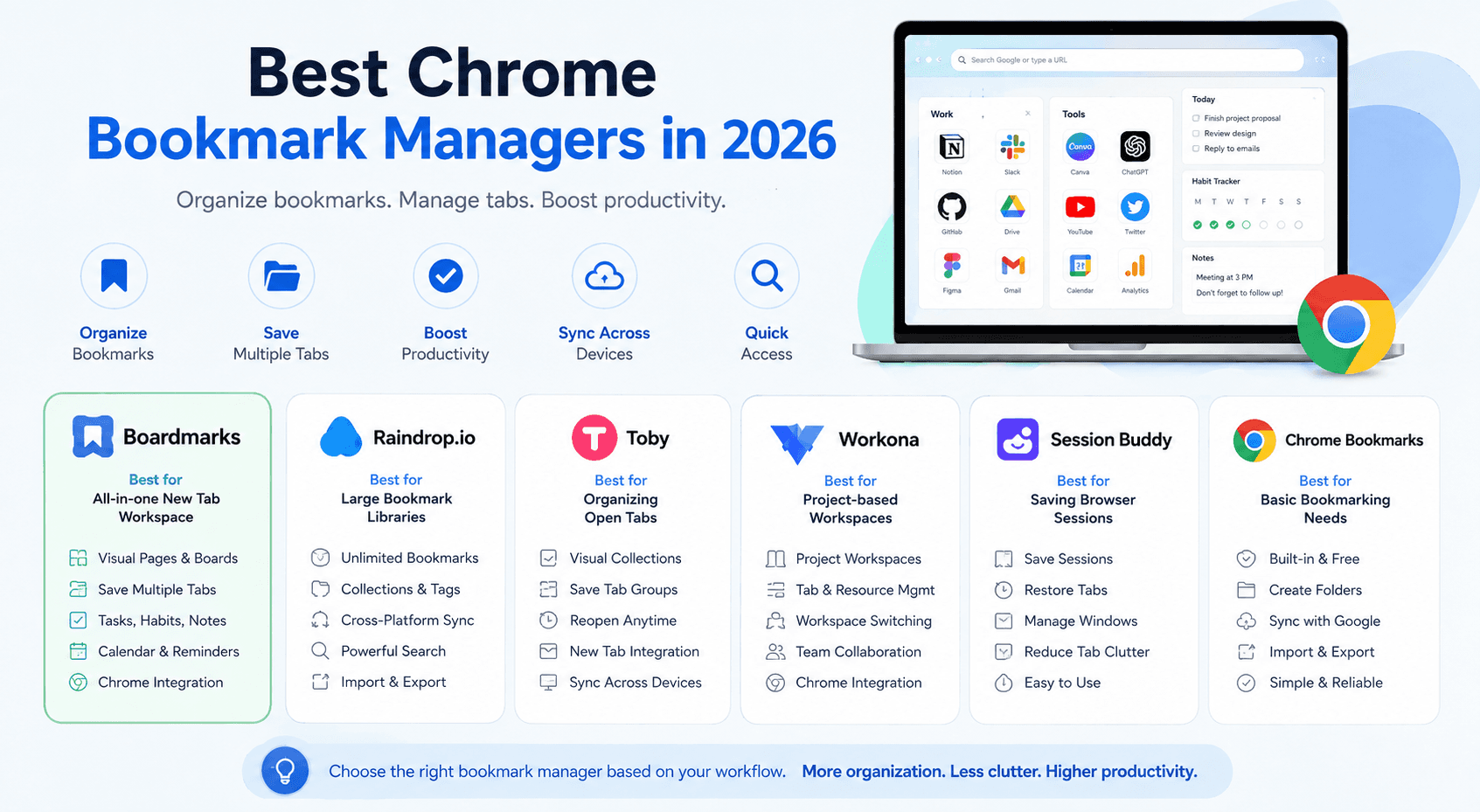
If your Chrome bookmarks have turned into dozens of folders, hundreds of forgotten links, and a bookmark bar you rarely use, a dedicated bookmark manager can make your browser much easier to organize.
The best Chrome bookmark manager in 2026 depends on what you actually need.
For users who want bookmarks, tasks, habits, notes, reminders, and everyday productivity tools directly on their New Tab page, Boardmarks is one of the most complete options.
If you want a large cross-platform bookmark library, Raindrop.io is a strong choice. If your main problem is having too many open tabs, Toby and Workona focus more heavily on tab and workspace management.
This guide compares some of the best bookmark managers for Chrome in 2026, including their strengths, limitations, and the type of user each one is best suited for.
Quick Answer: What Is the Best Chrome Bookmark Manager in 2026?
For most Chrome users who want more than traditional bookmark folders, Boardmarks is a strong all-in-one option because it turns the Chrome New Tab into a visual workspace.
Instead of opening a separate bookmark manager every time you need a saved website, your bookmarks appear whenever you open a new tab.
Boardmarks supports visual Pages and Boards, drag-and-drop organization, quick saving of the current page, saving multiple open tabs, Chrome bookmark importing, tasks, habits, notes, reminders, calendar tools, and customizable backgrounds.
For other workflows:
- Boardmarks — best for visual bookmarks + New Tab productivity
- Raindrop.io — best for a large cross-platform bookmark library
- Toby — best for visually organizing tabs into collections
- Workona — best for project-based browser workspaces
- Session Buddy — best for saving and restoring browser sessions
- Chrome Bookmarks — best for basic bookmarking without installing anything
The Best Chrome Bookmark Managers in 2026
| Bookmark Manager | Best For | Visual | Save Tabs | Productivity | Chrome |
|---|---|---|---|---|---|
| Boardmarks | All-in-one New Tab workspace | Yes | Yes | Yes | Yes |
| Raindrop.io | Large bookmark libraries | Yes | Limited | Limited | Yes |
| Toby | Tab collections | Yes | Yes | Limited | Yes |
| Workona | Project workspaces | Yes | Yes | Limited | Yes |
| Session Buddy | Browser sessions | Limited | Yes | No | Yes |
| Chrome Bookmarks | Simple bookmarking | No | Limited | No | Built in |
There isn't one perfect bookmark manager for everyone.
The important question is whether you primarily want to store links, manage open tabs, or build a more organized browser workspace.
Why Chrome's Built-In Bookmarks Can Become Difficult to Manage
Chrome already includes a bookmark manager.
For someone with 20 or 30 important websites, it may be everything they need.
The problem usually starts as the collection grows.
You might begin with folders like:
- Work
- Personal
- Tools
- Inspiration
Then those folders create more folders.
And eventually you end up with something like:
Bookmarks → Work → Clients → Project → Resources → Design
The bookmark technically exists, but finding it becomes the problem.
Chrome's traditional bookmark interface is primarily based around folders and lists. Modern bookmark managers approach the problem differently by using visual boards, collections, tags, workspaces, search, or New Tab dashboards.
That's why Chrome bookmark manager extensions have become useful for people who regularly research, work online, save tools, manage projects, or simply collect lots of useful websites.
1. Boardmarks — Best All-in-One Chrome Bookmark Manager
Best for: Chrome users who want bookmarks and productivity tools together.
Boardmarks takes a different approach to bookmark management.
Instead of making you visit another bookmark application, Boardmarks replaces your Chrome New Tab with a visual workspace for the websites and tools you use regularly.
You can organize websites into Pages and Boards, move bookmarks using drag and drop, resize and rearrange boards, and keep important links visible instead of burying them inside traditional folders.
What makes Boardmarks different?
The biggest difference is that bookmarks aren't treated as a separate part of your workflow.
Your bookmarks live next to tools such as:
That makes Boardmarks especially useful if Chrome is where you spend most of your working day.
What We Like About Boardmarks
Visual Pages and Boards
Instead of navigating long bookmark folder trees, websites can be grouped into visual Boards.
For example, you could create a Page called:
Work
And inside it create Boards for:
- Marketing
- Development
- Analytics
- Clients
- AI Tools
You can then rearrange those Boards based on how you actually work.
Save the Current Tab Quickly
Boardmarks includes a toolbar popup that lets you save the current website without going through Chrome's standard bookmark dialog.
Save All Open Tabs
Have 15 research tabs open?
Instead of bookmarking every page individually, Boardmarks can capture your open tabs and let you choose where they should be organized.
This can be especially useful for:
- Research
- Shopping comparisons
- Client projects
- Travel planning
- Development resources
- Competitor research
Import Existing Chrome Bookmarks
You don't necessarily have to rebuild your bookmark library from zero.
Existing Chrome bookmarks can be imported and reorganized into visual Boards.
Quick Saved Bookmarks
Sometimes you don't know exactly where a link belongs.
A Quick Saved area lets you capture the website first and organize it later.
Tasks and Todos
Boardmarks also includes task management directly inside your browser workspace.
That means your day's tasks can stay next to the websites you need to complete them.
Habit Tracker
Daily habits can also be tracked from the New Tab dashboard using a weekly tracking view.
Notes
A built-in notes area is useful for quick ideas, temporary information, links, or reminders you don't want to put into another application.
Calendar and Reminders
Boardmarks includes calendar-based notes and reminders with options such as priority, recurrence, snooze, and upcoming-item management.
Custom New Tab
You can also customize the look of your New Tab workspace instead of being limited to Chrome's default page.
Where Boardmarks Could Be Better
Boardmarks is designed specifically around the Chrome New Tab workflow.
If your main requirement is maintaining one huge bookmark database across many different browsers and mobile applications, a service like Raindrop.io may be a better fit.
Boardmarks is better suited to people who want their Chrome browser itself to become an organized productivity workspace.
When Boardmarks Wins
Choose Boardmarks if you regularly think:
“I don't just need somewhere to store bookmarks. I want the websites I use every day to stay organized and easy to access.”
It's particularly useful for developers, marketers, students, freelancers, researchers, creators, and people who spend much of their day working inside Chrome.
Best for: Visual bookmark organization + everyday productivity.
2. Raindrop.io — Best for Large Bookmark Libraries
Best for: People who want bookmarks available across multiple devices and browsers.
Raindrop.io is one of the most established dedicated bookmark managers available today.
It focuses less on turning your New Tab into a workspace and more on maintaining a central library of saved content.
You can organize links into collections and access them across Chrome, Safari, Firefox, Edge, desktop, and mobile platforms. Raindrop's free plan currently supports unlimited bookmarks, unlimited collections, and unlimited devices.
What We Like About Raindrop.io
- Unlimited bookmarks on the free plan
- Unlimited collections
- Chrome extension
- Mobile apps
- Cross-device access
- Visual bookmark layouts
- Import and export
- Sharing and collaboration
Raindrop Pro adds features such as full-text search, web archives, reminders, annotations, AI functionality, duplicate detection, broken-link detection, and daily backups.
Where Raindrop.io Could Be Better
Raindrop is primarily a bookmark library.
It isn't designed to combine your bookmarks, todo list, habits, daily planning, and New Tab experience in the same way Boardmarks does.
When Raindrop.io Wins
Choose Raindrop.io if you have thousands of saved resources and want them available across many browsers, computers, and mobile devices.
Best for: Cross-platform bookmark collections.
See also our Boardmarks vs Raindrop comparison.
3. Toby — Best for Organizing Open Tabs
Best for: People who constantly have too many Chrome tabs open.
Toby became popular by treating open tabs more like organized collections.
Instead of leaving 40 tabs running across several browser windows, you can save related tabs into groups and reopen them later.
Toby currently remains actively maintained. Its Chrome Web Store listing shows version 1.13.1, updated June 3, 2026, with more than 300,000 users listed.
What We Like About Toby
- Visual collections
- Save groups of tabs
- Open collections later
- Useful for project workflows
- New Tab integration
- Sync between devices
Toby is especially helpful for people who don't necessarily have a bookmark problem.
They have a tab problem.
For example:
You're researching a new product and have:
- 4 competitor sites
- 3 analytics tools
- 6 articles
- 2 Google Docs
- 4 Reddit discussions
Instead of keeping everything open forever, you can store that project as a collection.
Where Toby Could Be Better
Toby focuses heavily on tabs and collections.
If you're looking for a broader dashboard containing bookmarks, notes, reminders, todos, habits, and other New Tab productivity tools, Boardmarks covers a wider workflow.
When Toby Wins
Choose Toby when your biggest problem is:
“I have too many tabs open and I'm afraid I'll lose them.”
Best for: Visual tab collections.
See also Boardmarks vs Toby.
4. Workona — Best for Project-Based Browser Workspaces
Best for: Professionals who work on several projects at the same time.
Workona approaches browser organization through workspaces.
Instead of thinking primarily about individual bookmarks, you create a workspace for a project.
A workspace might contain the tabs and resources connected to:
- Client A
- Client B
- Marketing Campaign
- Product Launch
- University Project
- Research Topic
This makes Workona particularly useful for people whose browser activity changes depending on the project they're currently working on.
What We Like About Workona
- Project-based organization
- Tab groups
- Workspace switching
- Resource organization
- Useful for professional workflows
- Browser session organization
Where Workona Could Be Better
Workona can feel like more infrastructure than you need if your main goal is simply organizing websites visually.
It is better understood as a browser workspace manager than a traditional bookmark manager.
When Workona Wins
Choose Workona if most of your browser activity revolves around clearly separated projects or clients.
Best for: Project workspaces.
5. Session Buddy — Best for Saving Browser Sessions
Best for: Users who want to close Chrome without losing their tabs.
Session Buddy solves a slightly different problem.
Instead of focusing mainly on long-term bookmark organization, it is designed around browser sessions.
A browser session is essentially the group of windows and tabs you currently have open.
This is useful if you regularly end the day with 30 tabs open but don't want to permanently bookmark every single page.
What We Like About Session Buddy
- Save groups of tabs
- Restore previous sessions
- Reduce tab clutter
- Recover browser workflows
- Useful for research-heavy browsing
Where Session Buddy Could Be Better
Session management and bookmark management are related, but they're not the same thing.
Session Buddy is excellent for temporary groups of tabs.
It is less suited to building a polished visual homepage containing the sites and tools you use every day.
When Session Buddy Wins
Choose Session Buddy if your main goal is:
Close everything now. Restore everything later.
Best for: Tab and browser-session recovery.
6. Chrome's Built-In Bookmark Manager — Best for Basic Users
Best for: People with a small bookmark collection.
Before installing anything, don't forget that Chrome's built-in bookmark system is completely adequate for many users.
You can:
- Bookmark pages
- Create folders
- Rearrange bookmarks
- Search saved bookmarks
- Sync bookmarks through your Google account
- Import and export bookmarks
And it costs nothing.
The Problem
Chrome's bookmark system becomes harder to manage when your library becomes large.
Long folder structures eventually require you to remember where you saved something.
Modern bookmark managers try to reduce that friction by making bookmarks more visual, searchable, grouped by context, or integrated into everyday workflows.
When Chrome Bookmarks Win
Stick with Chrome's built-in system if you only save a relatively small number of websites and don't need visual organization.
Best for: Simple bookmark collections.
Boardmarks vs Raindrop.io vs Toby vs Workona
Here's the simplest way to understand the difference.
Choose Boardmarks if:
You want your New Tab to become your main productivity dashboard.
You want bookmarks alongside:
- Tasks
- Habits
- Notes
- Reminders
- Calendar tools
Choose Raindrop.io if:
You want a large, searchable bookmark database that works across devices and browsers.
Choose Toby if:
You want to turn dozens of open Chrome tabs into visual collections.
Choose Workona if:
You organize your browser around clients, projects, or workspaces.
Choose Session Buddy if:
You mainly want to save and restore groups of tabs.
Use Chrome Bookmarks if:
You only have a small bookmark library and don't need extra features.
Which Chrome Bookmark Manager Is Best for Productivity?
If productivity is the priority rather than simply storing URLs, look for a bookmark manager that reduces the number of separate tools you have to open during the day.
For example, a typical browser workflow might involve:
- Chrome bookmarks for websites
- A todo app for tasks
- Another app for habits
- Sticky notes for ideas
- A calendar for reminders
Boardmarks combines these types of everyday tools inside the New Tab workspace while still making bookmark organization the central experience.
That can reduce context switching because the dashboard appears whenever you open a new tab.
Which Bookmark Manager Is Best for Students?
Students typically need to save:
- Research papers
- Learning platforms
- YouTube tutorials
- Course resources
- Assignment portals
- Useful tools
- Reference websites
A visual bookmark manager can make these easier to divide by course or subject.
For example:
Page: College
Boards:
- Semester 1
- Research
- Assignment Tools
- Tutorials
- References
Boardmarks works particularly well for this type of visual organization because Pages and Boards can be arranged around subjects or projects.
Students who need a permanent research archive across many devices may prefer Raindrop.io.
Which Bookmark Manager Is Best for Developers?
Developers frequently save:
- Documentation
- GitHub repositories
- Stack Overflow answers
- APIs
- Hosting dashboards
- Development tools
- AI tools
- Testing environments
Traditional bookmark folders work, but visual Boards can make regularly used development resources easier to access.
For example:
Development
- Frontend
- Backend
- APIs
- DevOps
- AI
- Testing
A tool like Boardmarks works well when those resources are accessed frequently.
Raindrop.io may be better when your goal is building a huge long-term technical reference library.
Which Bookmark Manager Is Best for Research?
For short-term research involving many open tabs, Toby or Session Buddy can be useful.
For long-term reference libraries, Raindrop.io is stronger.
For research that you want separated into visual project Boards directly inside Chrome, Boardmarks provides a useful middle ground.
How to Choose the Right Chrome Bookmark Manager
Before installing a bookmark manager, ask yourself these five questions.
1. Do I want bookmarks or tab management?
They're different problems.
Bookmarks are websites you want to keep.
Tabs are websites you're currently using.
Some extensions specialize in one, while others overlap.
2. Do I work mostly inside Chrome?
If yes, a Chrome-focused New Tab organizer can provide a very integrated experience.
If you frequently switch between Chrome, Firefox, Safari, mobile devices, and several operating systems, cross-platform services become more important.
3. Do I want visual organization?
Traditional bookmark folders are compact.
Visual Boards are easier to scan.
Neither is automatically better — it depends on how you remember information.
4. Do I need productivity features?
If you're already using separate apps for todos, habits, notes, and reminders, combining them with your New Tab may simplify your workflow.
5. Do I want permanent storage or temporary sessions?
For temporary research sessions, tab/session managers are ideal.
For resources you want to keep for years, a dedicated bookmark library makes more sense.
Frequently Asked Questions
- What is the best Chrome bookmark manager in 2026?
- For users who want visual bookmarks and productivity tools directly on their Chrome New Tab, Boardmarks is one of the strongest all-in-one options. For large cross-platform bookmark libraries, Raindrop.io is a better choice. For tab collections, consider Toby. For project-based workspaces, consider Workona.
- Is there a better bookmark manager than Chrome?
- Yes, depending on your needs. Chrome's built-in bookmark manager works well for simple collections, but third-party bookmark managers can add visual Boards, collections, tags, advanced search, tab management, workspaces, reminders, and other productivity features.
- What is the best visual bookmark manager for Chrome?
- Boardmarks, Raindrop.io, and Toby all provide more visual organization than traditional Chrome bookmark folders. Boardmarks is particularly suited to people who want visual bookmark Boards directly on their New Tab page.
- Can I organize Chrome bookmarks without folders?
- Yes. Modern bookmark managers can organize links using Boards, collections, tags, workspaces, or cards rather than relying completely on traditional nested folders. Boardmarks uses Pages and Boards, giving bookmarks a more visual structure.
- Can I save all open Chrome tabs as bookmarks?
- Yes. Some bookmark and tab-management extensions support saving multiple open tabs. Boardmarks includes an option for capturing open tabs and selecting the Board where you want to organize them.
- Can I import my existing Chrome bookmarks?
- Yes. Many bookmark managers support importing bookmarks. Boardmarks can import existing Chrome bookmarks and turn them into visual Boards, which means you don't have to manually recreate an existing bookmark library.
- Is Raindrop.io free?
- Yes. Raindrop.io currently offers a free plan with unlimited bookmarks, unlimited collections, unlimited highlights, and unlimited devices. More advanced features are available through Raindrop Pro.
- Is Toby still available in 2026?
- Yes. Toby remains available in the Chrome Web Store and was updated in June 2026. Its Chrome Web Store listing currently shows more than 300,000 users.
- What is the best bookmark manager for people with hundreds of bookmarks?
- If you need a large long-term database with powerful cross-platform access, Raindrop.io is a strong option. If most of those bookmarks are websites you regularly use inside Chrome and you want to arrange them visually, Boardmarks may offer a simpler everyday workflow.
- What is the best bookmark manager for saving research tabs?
- Toby, Session Buddy, and Boardmarks can all help, but they approach the problem differently. Toby focuses on tab collections. Session Buddy focuses on saving browser sessions. Boardmarks lets you save open tabs into visual bookmark Boards for longer-term organization.
Final Verdict: The Best Chrome Bookmark Managers in 2026
There is no single bookmark manager that's perfect for every Chrome user.
The best option depends on what problem you're trying to solve.
Boardmarks is best if you want an organized Chrome New Tab where bookmarks, tasks, habits, notes, calendar items, and reminders can live together.
Raindrop.io is best if your priority is maintaining a large cross-platform bookmark library.
Toby is excellent for organizing collections of open tabs.
Workona works best for project-based browsing.
Session Buddy is a good choice for saving and restoring browser sessions.
And Chrome's built-in bookmarks remain perfectly adequate if your bookmark collection is small.
If you spend most of your working day inside Chrome and want something more useful than a folder-based bookmark bar, a visual bookmark manager can turn saved websites from forgotten links into an actual part of your daily workflow.
Try Boardmarks for Chrome
Turn your New Tab into a visual workspace for bookmarks, tasks, habits, notes, reminders, and the websites you use every day.
Explore Boardmarks on the website, or install from the Chrome Web Store.
Add Boardmarks to Chrome — FreeRelated
Chrome New Tab extension
Organize bookmarks, todos, and habits on every New Tab.
- Visual bookmark boards
- Todos, habits, notes, reminders
- Local-first by default
7-day free trial. No card required.