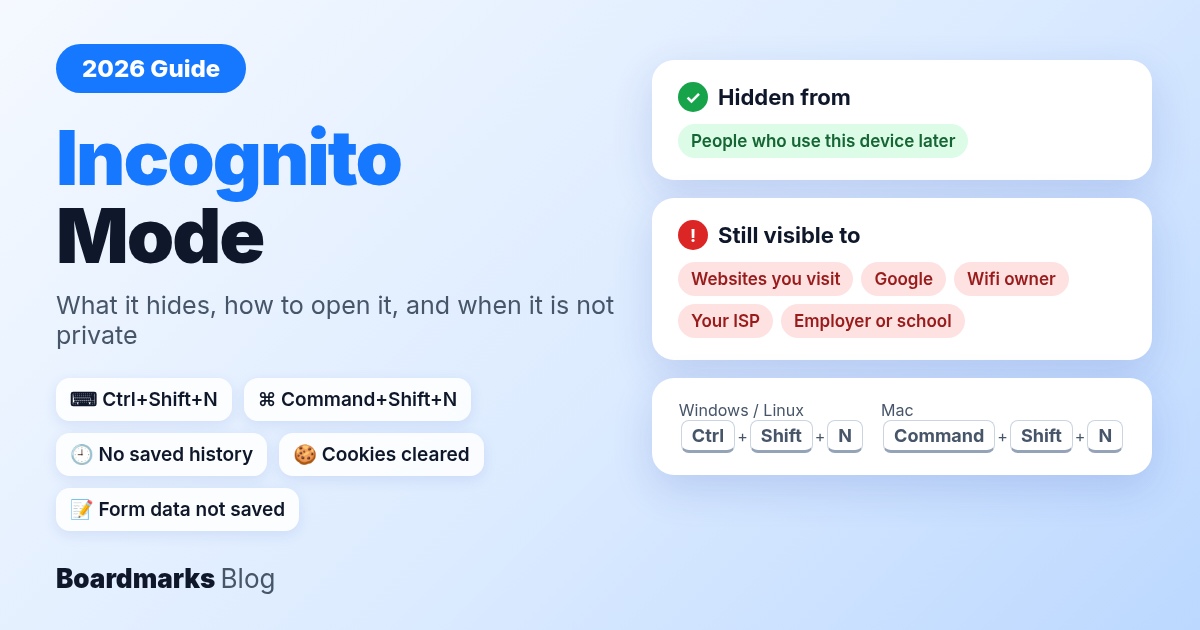
Incognito mode is Chrome’s private browsing window. Once you close every Incognito window, Chrome does not keep your history, cookies, or form data from that session on the device. It does not hide you from websites, Google, your wifi owner, or your employer. Open it with Ctrl + Shift + N on Windows, or Command + Shift + N on Mac. Other browsers call the same feature InPrivate (Edge) or Private Browsing (Safari and Firefox).
Table of contents
What Is Incognito Mode and What Does It Hide?
Incognito Mode Shortcuts by Browser (Windows and Mac)
How to Open Incognito Mode on Windows
How to Go Incognito on Mac
How to Use Incognito Mode on Android and iPhone
Is Incognito Mode Safe?
Does Incognito Hide Your History From Wifi or Your Employer?
How to Turn Off Incognito Mode
When Incognito Mode Is Useful
FAQ
What Is Incognito Mode and What Does It Hide?
Incognito mode opens a separate Chrome window whose history, cookies, and site data are discarded when the session ends. That is privacy on the device, not on the network.
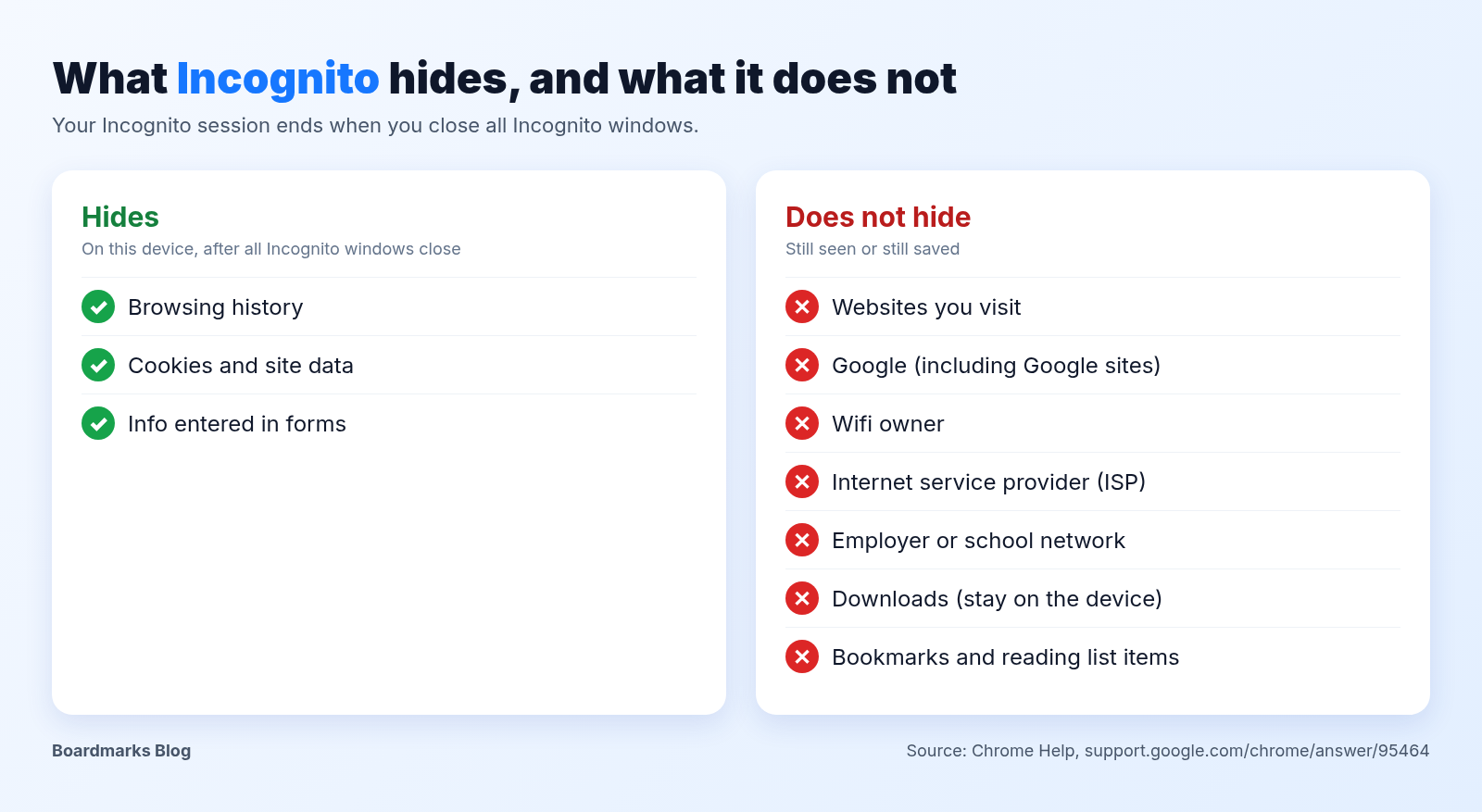
| Incognito hides (on this device, after the session) | Incognito does not hide |
|---|---|
| Pages in your Chrome history | Your activity from the websites you visit |
| Cookies and site data from the session | Data collected by Google and other services |
| Form data you typed | Traffic seen by your wifi, school, or office network |
| Logins that lived only in that window | Your internet provider (for example Jio or Airtel) |
| Monitoring on a work laptop | |
| Files you download and bookmarks you add |
Google’s help page also says that by default, third-party cookies are blocked in Incognito mode. If you sign in to Gmail or another account inside the window, that site still knows it is you.
What stays saved (downloads, bookmarks)
Google’s Chrome Help is direct about this: “Bookmarks you add and reading list items you save will be available in your regular browsing sessions. Files that you download will remain on your device until you delete them.”
Incognito, InPrivate and Private Browsing: same idea, different names
Private browsing is the general term. Chrome calls it Incognito, Microsoft Edge calls it InPrivate, and Safari and Firefox call it Private Browsing. Each one keeps the session out of local history after you close the private windows, and none of them hides you from the network.
Incognito Mode Shortcuts by Browser (Windows and Mac)
One trap: Firefox uses P, while Chrome, Edge, and Safari use N.
| Browser | Mode name | Windows | Mac | Menu path |
|---|---|---|---|---|
| Google Chrome | Incognito | Ctrl + Shift + N | Command + Shift + N | More (three dots) > New Incognito window |
| Microsoft Edge | InPrivate | Ctrl + Shift + N | Command + Shift + N | Windows: Settings and more > New InPrivate window, or right-click Edge in the taskbar > New InPrivate window |
| Safari (Mac only) | Private Browsing | Not available | Shift + Command + N | File > New Private Window |
| Mozilla Firefox | Private Browsing | Ctrl + Shift + P | Command + Shift + P | Menu (three lines) > New private window |
Sources: Chrome Help, Chrome keyboard shortcuts, Microsoft: Browse InPrivate in Microsoft Edge, Apple: Browse privately in Safari on Mac, Mozilla: Private Browsing, and Mozilla keyboard shortcuts.
How to Open Incognito Mode on Windows
Chrome and Edge share a shortcut on Windows. Firefox is the odd one out.
Incognito mode in Chrome on Windows
Open Chrome.
Press Ctrl + Shift + N, or click More (three dots) > New Incognito window.
Browse in the dark-themed window.
Close every Incognito window when you finish.
InPrivate in Edge on Windows
Press Ctrl + Shift + N in Edge, or select Settings and more > New InPrivate window.
Or right-click the Edge logo in the taskbar and choose New InPrivate window.
Microsoft is clear about the limits: “Other people using this device won't see your browsing activity, but your school, workplace, and internet service provider might still be able to access this data.”
Firefox private window on Windows
Press Ctrl + Shift + P, or open the Firefox menu (three lines) and choose New private window. If you press N out of habit, you will not get a private window.
Open a link in a private window
In Chrome, Edge, or Firefox, right-click a link and choose the option to open it in an Incognito, InPrivate, or private window.
How to Go Incognito on Mac
The steps on a Mac are the same idea. The only differences are the Command key and Safari’s menu.
Incognito shortcut on Mac in Chrome
Press Command + Shift + N, or click More (three dots) > New Incognito window. If you like keyboard shortcuts on your Mac, our Task Manager on Mac guide covers the shortcuts for frozen apps.
Private Browsing in Safari on Mac
Open Safari.
Choose File > New Private Window, or press Shift + Command + N.
A private window has a dark Smart Search field with white text.
To always start private, go to Safari > Settings > General and set Safari opens with to A new private window.
InPrivate in Edge on Mac
Press Command + Shift + N, or select Settings and more > New InPrivate window. The same school, workplace, and ISP limits apply.
Firefox private window on Mac
Press Command + Shift + P, or open the menu (three lines) and choose New private window.
How to Use Incognito Mode on Android and iPhone
On phones you mostly open Incognito tabs rather than windows. The limits are the same.
Incognito mode on Android (Chrome)
Open Chrome.
Tap More > Open in a new Incognito window. Tablets may show New Incognito window.
To open a single link privately, touch and hold it, then choose Open link in new Incognito window.
Incognito mode on iPhone (Chrome and Safari Private Browsing)
Chrome: tap More > New Incognito Tab.
Safari: Apple calls it Private Browsing. Tap More, then New Private Tab. On iOS 17 and earlier, tap the Tabs button and swipe to the Private tab group. The address bar turns dark while Private Browsing is on.
Lock Incognito tabs with your fingerprint or Face ID
On a shared phone, locking matters as much as opening.
Android (Chrome): More > Settings > Privacy and security, then turn on Lock Incognito windows when you leave Chrome. Google notes some steps apply to Android 11 and up.
iPhone (Chrome): More > Settings > Privacy and security > Hide Incognito tabs, then choose Lock immediately with device authentication, Hide after a few minutes, or Don't hide.
iPhone (Safari): Apple lets you lock Private Browsing with Face ID, Touch ID, or your passcode from Safari settings.
Without a lock, anyone who opens Chrome on your unlocked phone can switch to the Incognito tabs you left open.
Is Incognito Mode Safe?
Incognito mode is safe for its real job, which is keeping a session out of Chrome’s history on a shared device. It does not protect you from phishing, malware, or network monitoring. Google’s Android help puts it plainly: “While Incognito can help keep your browsing private on your device, it doesn't make you invisible. Websites you visit, including Google sites, and organizations that manage your network, like your school, employer, or internet service provider, may be able to observe your activity in Incognito.”
Your usual habits still apply inside it. Check the address before typing a password, and sign out before you close the window on a public computer.
What Google's Incognito screen says now
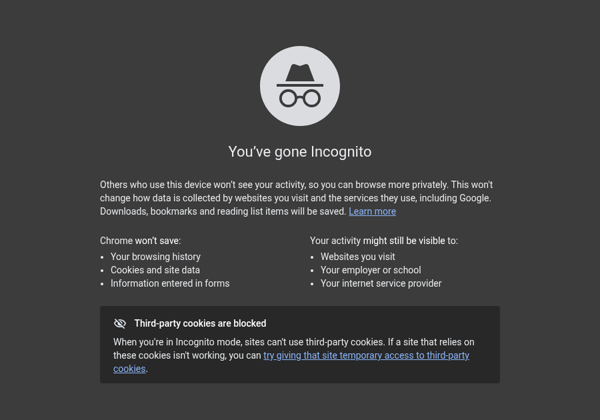
We read the desktop strings in Google Chrome 154.0.8037.97 on Linux. Under the heading “You've gone Incognito”, the screen says:
Others who use this device won't see your activity, so you can browse more privately. This won't change how data is collected by websites you visit and the services they use, including Google. Downloads, bookmarks and reading list items will be saved.
The 2024 Google incognito settlement in plain words
In Brown v. Google, a US class action over private browsing, the settlement was filed in federal court in California on 1 April 2024 (Reuters; NPR; court filing on CourtListener). The users said Google tracked people who believed they were browsing privately.
As reported, Google agreed to rewrite its private browsing disclosures, delete or remediate billions of records, and keep third-party cookies blocked in Incognito for five years. Reuters reported that Google paid no damages to the class. For everyday users, the takeaway is that the screen is now more honest about its limits. The settlement did not make Incognito hide you from websites or networks.
Does Incognito Hide Your History From Wifi or Your Employer?
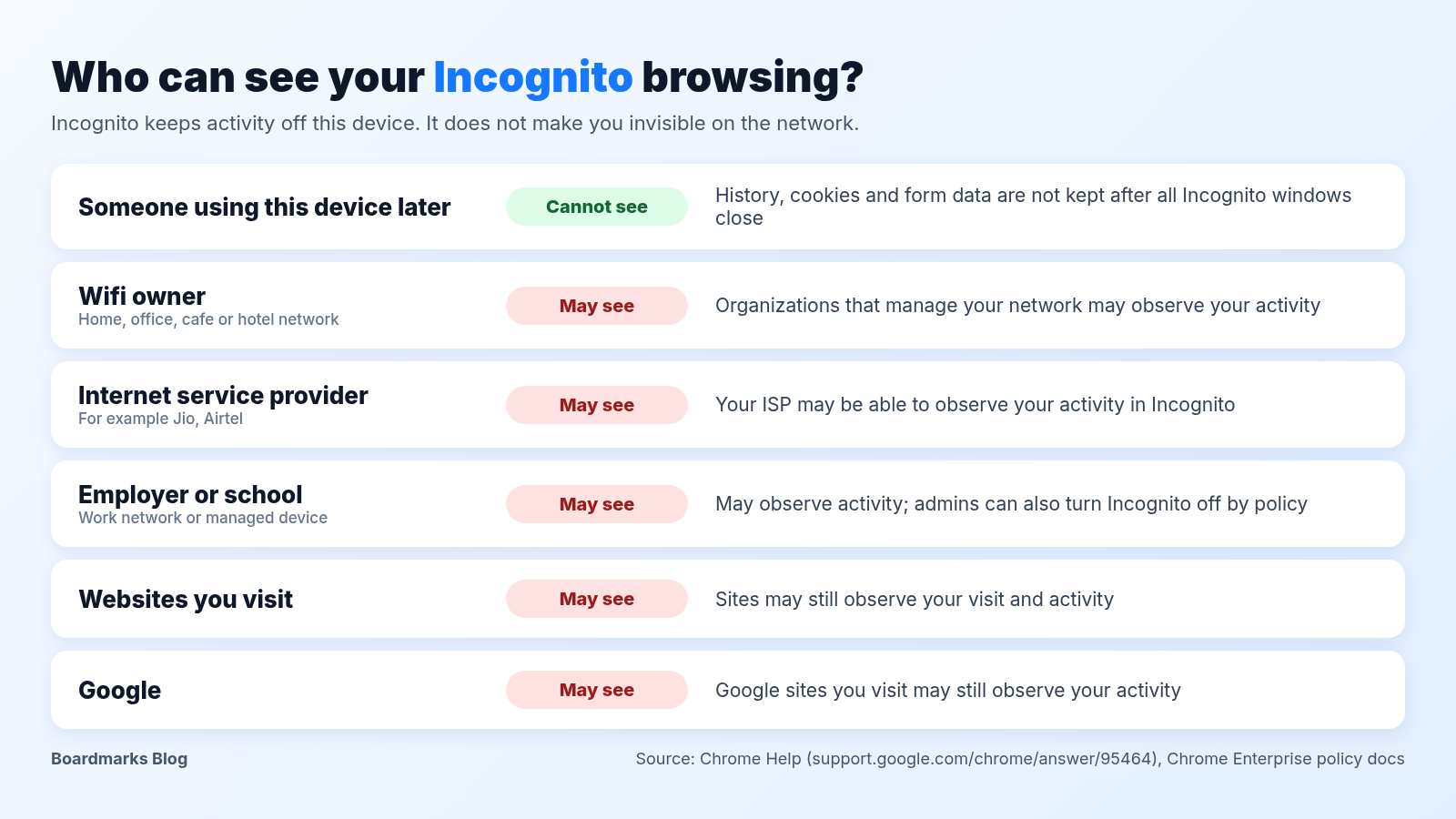
No. Incognito hides your session from the next person who uses Chrome on that device. The network may still see your traffic.
Home wifi and your internet provider
Your router owner and your ISP, such as Jio or Airtel, may still see which domains you connect to. HTTPS encrypts the page content but not the fact that you visited the site. On mobile data, your carrier may have the same view.
Office wifi and work laptops
College, hostel, and office wifi admins may see similar connection data. A work laptop with a proxy or monitoring software may show your employer much more. When you work from home on a company laptop, the monitoring goes with the device. Keep personal browsing on a personal device.
| Who | What they may see with Incognito |
|---|---|
| The next person using this device | Not your history, cookies, or form data from the closed session |
| Home wifi owner | May see domains you connect to on that network |
| ISP (for example Jio or Airtel) | May see domains you connect to on that connection |
| Employer device or proxy | May see much more, depending on monitoring |
| Websites you visit | May see your activity on their site, as usual |
| Google and other services | May see activity on their sites and services |
How to Turn Off Incognito Mode
“Turn off” can mean exiting a session or disabling the feature for good. Those are separate jobs.
Close a private window on Windows and Mac
Close every Incognito, InPrivate, or private window in all four browsers. Google’s help says: “Your Incognito session ends when you close all Incognito windows.” If one private window is still open, the session is still live.
Closed Incognito tabs do not appear in history. Our guide on how to restore closed tabs in Chrome works for normal tabs only.
Close all Incognito tabs on Android and iPhone
Android: tap More > Close all Incognito tabs, or close them from the Incognito side of the tab switcher.
iPhone (Chrome): open the tab switcher, tap the Incognito icon, then Edit > Close All Tabs.
Disable Incognito on a child's or work device
Admins can set Chrome’s IncognitoModeAvailability policy to Enabled, Disabled, or Forced. Google’s policy page says: “If 'Disabled' is selected, pages may not be opened in Incognito mode.” Forced does the opposite, which suits a shared kiosk.
For supervised family accounts, Google’s Family Link help says: “Incognito mode is turned off when your child is signed in to Chrome with an account managed by Family Link.” Details: Chrome and your child's Google Account.
For Edge, Microsoft says: “Children with activity reporting or web filtering enabled through their family group can't browse InPrivate. Organizations, like schools or workplaces, can use group policy to prevent people from browsing InPrivate.”
When Incognito Mode Is Useful
Incognito mode earns its place in a few everyday situations, especially if you work from home on a laptop the family also uses:
Shared family laptop: browse without leaving history for the next person.
Gift shopping: keep the surprise out of your history and autofill.
Second account login: check a client dashboard or a colleague’s view without mixing cookies with your main session.
Testing a site logged out: see a page without your signed-in state. Extensions do not run in Incognito unless you turn on Allow in Incognito in that extension’s details, and you cannot add extensions while in Incognito. Our best Chrome extensions list covers useful picks for your normal profile.
Incognito opens its own new tab page, so your custom Chrome new tab and Chrome startup tabs only apply in normal windows. Before you hand a shared machine over, save all open tabs in Chrome from your normal window.
Boardmarks is our Chrome extension, so we are not neutral. Keep your saved boards and bookmarks in your normal Chrome profile. Then on a shared machine you can browse privately in Incognito and still keep your real saved links separate.
- Can my parents see my incognito history?
- Not in Chrome’s history after you close every Incognito window. They may still see activity through the home wifi, router logs, parental controls, or monitoring software on the device.
- Can the wifi owner see what I search in incognito mode?
- They may see which sites you connect to. Incognito mode does not hide traffic from the wifi owner or your ISP.
- What is the shortcut for incognito mode on Windows and Mac?
- Chrome and Edge use Ctrl + Shift + N on Windows and Command + Shift + N on Mac. Safari uses Shift + Command + N. Firefox uses Ctrl + Shift + P or Command + Shift + P.
- Does Safari have incognito mode?
- Yes, under the name Private Browsing. On Mac, choose File > New Private Window. On iPhone, tap More > New Private Tab.
- Does incognito mode hide my IP address?
- No. Websites and services still see the IP address from your network, just as they do in a normal window.
- Do downloads stay after incognito mode?
- Yes. Downloaded files stay on your device until you delete them, and bookmarks you add stay in your normal profile.
Chrome New Tab extension
Organize bookmarks, todos, and habits on every New Tab.
- Visual bookmark boards
- Todos, habits, notes, reminders
- Local-first by default
Free trial · no card required