The quickest way to restart Chrome without losing tabs is to type chrome://restart in the address bar, or to click Relaunch when Chrome has an update ready. Google's help pages say both reopen your tabs and windows. Incognito windows are the exception: they do not come back. If you plan to quit Chrome or restart your whole computer instead, check one setting first: On startup > Continue where you left off. With that on, Chrome opens the same pages the next time you start it. This guide covers planned restarts, Chrome updates and computer restarts on Windows and Mac. The comparison table sums up all three methods.
Table of contents
Before You Restart Chrome: A 1-Minute Checklist
Check One Setting First: Continue Where You Left Off
Restart Chrome With chrome://restart (the Restart Command)
Relaunch Chrome to Update Without Losing Tabs
Quit and Reopen Chrome on Windows and Mac
Restart Your Computer Without Losing Chrome Tabs
Back Up Your Tabs Before a Big Restart
FAQ
Three ways to restart Chrome and what happens to your tabs:
Method | When to use it | What happens to your tabs |
|---|---|---|
Relaunch button | A Chrome update is ready (About Chrome, or a Relaunch to update prompt). | Regular tabs and windows reopen. Incognito windows do not. (Chrome Help) |
chrome://restart | You want to restart Chrome from the address bar. | Google Meet Help says your tabs and windows reopen. Chrome Help does not document this URL. Do not expect Incognito windows to return. |
PC restart, or quit and reopen, with Continue where you left off | You are restarting the computer, or quitting Chrome and opening it again. | Pages come back only if On startup is set to Continue where you left off (Chrome Help). If site data is set to delete when you close all windows, you can be signed out. |
Before You Restart Chrome: A 1-Minute Checklist
Run through this list before any restart.
Copy anything you need from Incognito windows. Chrome Help is clear: "Your Incognito windows won't reopen when Chrome restarts." Copy any URLs you still need first. More on how Incognito mode works.
Finish downloads and uploads. Leave any call or meeting, too.
Save what you have typed. Text in a half-filled form can be lost.
Watch your profiles if you use more than one. Some Chrome users have reported that a Relaunch reopened only one of two profiles. That is a user report, not something Google documents.
Know the backup plan. If tabs do go missing, Chrome's help pages list Ctrl + Shift + T (Cmd + Shift + T on Mac) to reopen tabs that were open before. For more, see how to restore closed tabs in Chrome.
Check One Setting First: Continue Where You Left Off
This setting decides whether your tabs survive a normal quit or a computer restart. Chrome Help puts it this way: "You can tell Chrome to re-open the same pages you were looking at when you quit."
To turn it on:
At the top right of Chrome, click More (the three dots), then Settings.
On the left, select On startup.
Choose Continue where you left off.
Or paste chrome://settings/onStartup into the address bar.
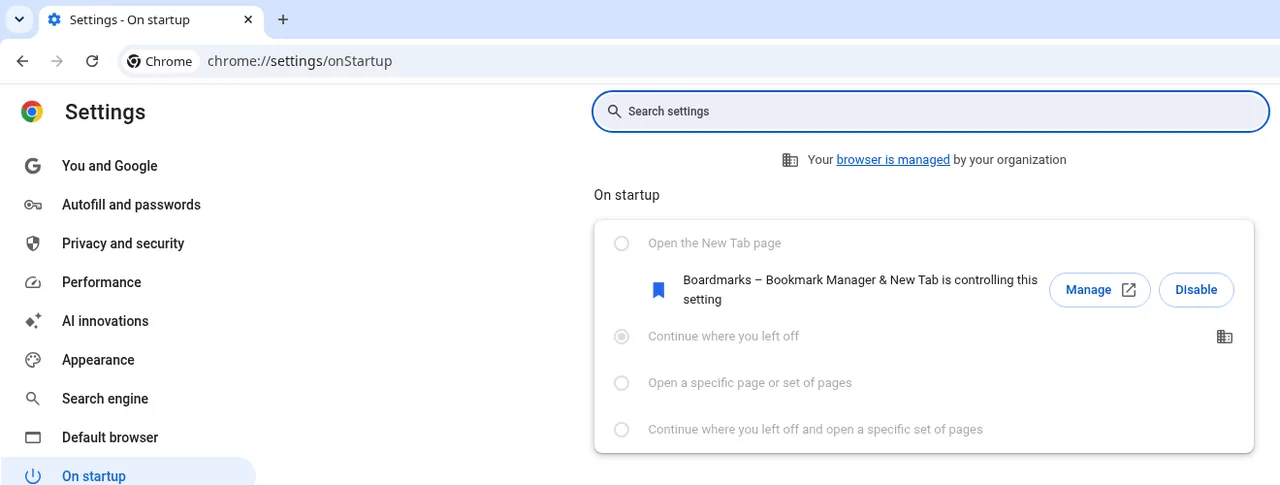
Settings > On startup in Chrome 156, captured on Linux 18 Nov. The options are greyed out because this browser is managed by an organization. On your computer, you can pick any option. The Boardmarks line shows because our extension, Boardmarks, replaces the New Tab page. It does not choose your startup option.
Chrome Help adds: "Your cookies and data are saved, so any websites you were logged into before open again." There is one catch. If you have turned on Delete data sites have saved on your device when you close all windows (Settings > Privacy and security > Site settings > Additional content settings > On-device site data), closing all windows can sign you out of sites, even though the same pages reopen.
On a work or school Chromebook, your administrator controls startup pages. For other startup modes, see how to choose what Chrome opens on startup.
Restart Chrome With chrome://restart (the Restart Command)
First, a plain fact: this address is not documented in Google Chrome Help. The official mention comes from Google Meet Help, in a fix for microphone problems: "In your browser, enter chrome://restart." The same page says: "When you restart Chrome, your tabs and windows reopen."
To use it:
Click the address bar, or press Ctrl + L on Windows (Cmd + L on Mac).
Type
chrome://restart.Press Enter.
Chrome closes, then opens again with the same tabs.

The restart address typed in the Chrome address bar, before pressing Enter. Chrome 156, captured on Linux 18 Nov.
Chrome's keyboard shortcuts page lists no shortcut for restart or relaunch. If you restart often, bookmark that address for a one-click restart.
For the curious, Chromium's source code backs this up. The URL is defined as kChromeUIRestartURL in webui_url_constants.h, and the restart routine in application_lifetime_desktop.cc saves the session state for each open window's profile. That is what the code on Chromium's main branch is written to do (read on 18 November 2026), not a test of the Chrome you have installed.
What it will not bring back: Chrome Help says Incognito windows do not reopen when Chrome restarts, and Meet Help says nothing about Incognito, unsaved form text or multiple profiles. Treat those as lost unless you saved them first.
Relaunch Chrome to Update Without Losing Tabs
When an update is waiting, Chrome asks you to relaunch. This is the restart Google documents in Chrome Help, and the simplest way to get a Chrome update without losing tabs.
To relaunch:
At the top right, click More (the three dots).
Go to Help > About Google Chrome.
Click Relaunch.
You may also see a button in the Chrome menu labeled something like "Relaunch to update". Click the one you see.
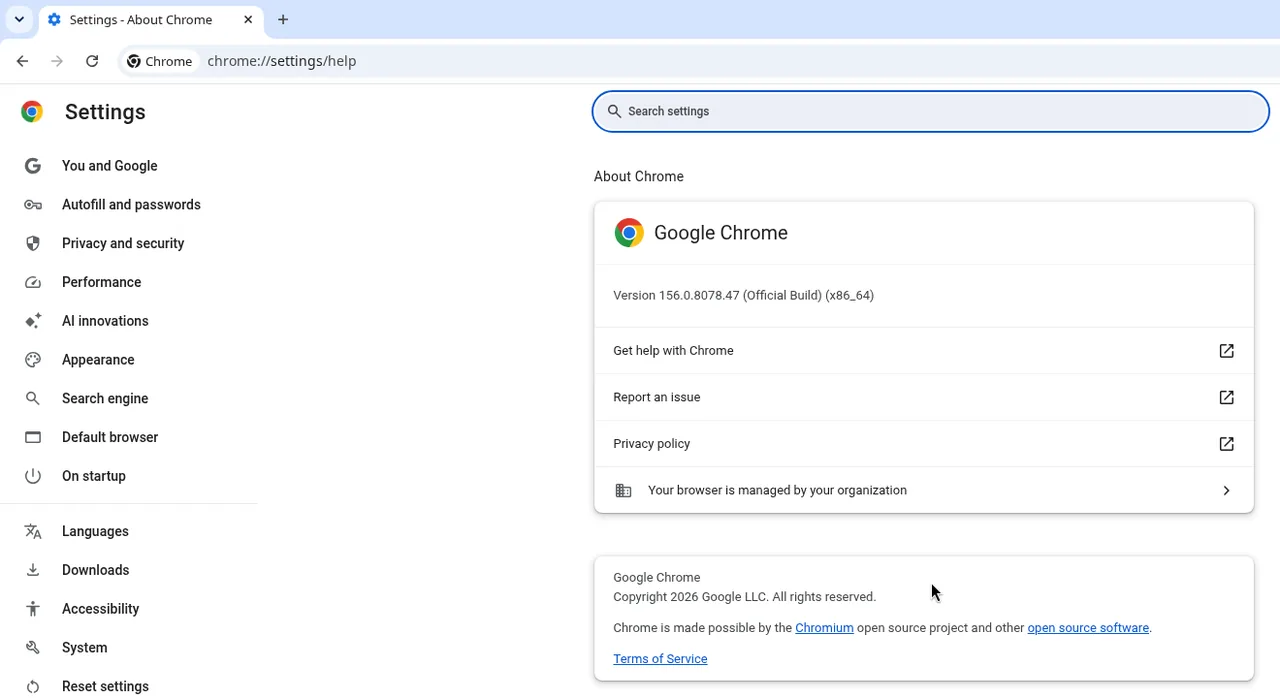
About Chrome in Chrome 156, captured on Linux 18 Nov. No Relaunch button showed on this managed Linux browser. On your computer, the button appears here when an update is ready.
Here is what Chrome Help says happens next: "The browser saves your opened tabs and windows and reopens them automatically when it restarts. Your Incognito windows won't reopen when Chrome restarts."
A few more points from the same page:
No Relaunch button? "If you can't find the "Relaunch" option, you're on the latest version."
Busy right now? "If you don't want to restart right away, select Not now. The update applies the next time you restart Chrome."
On Windows: "Close all Chrome windows and tabs on the desktop, then relaunch Chrome to apply the update."
Google also notes that updates normally happen in the background when you close and reopen the browser. On a work or school computer, your organization may require a restart once an update arrives.
Quit and Reopen Chrome on Windows and Mac
Your tabs come back after a quit only if you turned on Continue where you left off, as described in the setting section of this guide.
Quit Chrome with the shortcut from Chrome's keyboard shortcuts page:
Windows: press Alt + F, then X.
Mac: press Cmd + Q.
Then open Chrome again as usual.
One reminder: if Chrome is set to delete site data when you close all windows, you may need to sign in to sites again, even though the tabs reopen.
Restart Your Computer Without Losing Chrome Tabs
The same Chrome setting does the work when you restart a PC, a laptop or a Mac.
To restart your computer without losing Chrome tabs:
Turn on Continue where you left off (Settings > On startup).
Quit Chrome normally: Alt + F, then X on Windows, or Cmd + Q on Mac.
Restart your computer.
Open Chrome. Your pages should reopen.
The steps are the same on Windows and Mac because the setting lives inside Chrome, not in your operating system.
The sign-out caveat applies here too. If Delete data sites have saved on your device when you close all windows is on, expect to sign in again after the restart.
Back Up Your Tabs Before a Big Restart
Before a restart you cannot afford to get wrong, such as a major system update, save a copy of your tabs.
Bookmark all open tabs
Chrome has this built in. Chrome's keyboard shortcuts page lists "Save all open tabs as bookmarks in a new folder" as Ctrl + Shift + D (Cmd + Shift + D on Mac). For more options, see how to save all open tabs in Chrome.
Optional backup with our extension, Boardmarks
Our extension, Boardmarks, can keep a copy too. Open the Boardmarks popup from the Chrome toolbar, pick a board (the default is Quick Saved), then click Save all tabs to save all open tabs in the current window to that board. You can then reopen the set later from your New Tab. The save all tabs feature page explains how it works. Boardmarks is not free: it comes with a 7-day trial, then a Pro plan.
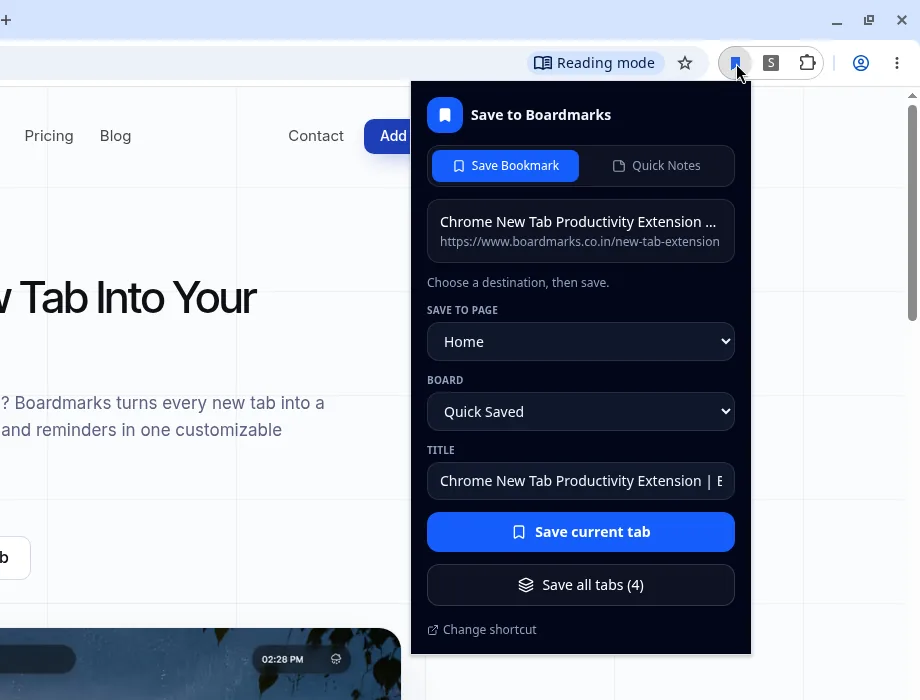
Our extension, Boardmarks: the Save to Boardmarks popup, with Quick Saved as the board and the Save all tabs (4) button. Chrome 156, captured on Linux 18 Nov.
To restart Chrome without losing tabs, use chrome://restart or Relaunch for a quick restart. Before you quit Chrome or restart your computer, turn on Continue where you left off. Copy anything from Incognito first, because it will not come back.
- Can I restart Chrome without losing tabs?
- Yes, for regular tabs. Google's help pages say chrome://restart and Relaunch both reopen your tabs and windows. For a quit or a PC restart, turn on Continue where you left off first. Incognito windows will not come back.
- What does chrome://restart do?
- It restarts Chrome from the address bar. Google Meet Help gives it as a restart step and says your tabs and windows reopen. Chrome Help does not document it.
- If I relaunch Chrome to update, will I lose my tabs?
- No, not your regular tabs. Chrome Help says the browser saves your opened tabs and windows and reopens them when it restarts. Incognito windows will not reopen.
- Will Incognito tabs come back after a restart?
- No. Chrome Help says: "Your Incognito windows won't reopen when Chrome restarts." Copy any URLs you need before you restart.
- Is there a keyboard shortcut to restart Chrome?
- No. Chrome's keyboard shortcuts page lists none for restart or relaunch. Bookmark chrome://restart instead and click it when you want a restart.
- How do I restart my computer without losing my tabs?
- Turn on Continue where you left off in Chrome's On startup settings, quit Chrome normally, then restart your PC or laptop. If Chrome deletes site data when you close all windows, you may need to sign in again.
- Does restarting your Mac close Chrome tabs?
- Chrome will only bring the same pages back after a Mac restart if On startup is set to Continue where you left off. Quit Chrome with Cmd + Q first, then restart the Mac.
Chrome New Tab extension
Organize bookmarks, todos, and habits on every New Tab.
- Visual bookmark boards
- Todos, habits, notes, reminders
- Local-first by default
Free trial · no card required